Agentic Workflows Explained: Patterns, Examples and When to Use Them
Agentic workflows sit between fixed automations and fully autonomous agents. Learn what they are, the patterns behind them, real examples, and a 5-question checklist for when to use one.
Most teams asking "should we use AI agents?" are asking the wrong question. The useful question is how much freedom a given task actually needs, and how you will run, watch and approve it once it is live.
That question matters because the failure rate is real. In June 2025, Gartner predicted that over 40% of agentic AI projects will be canceled by the end of 2027, citing escalating costs, unclear business value and inadequate risk controls. Most of those projects will not fail because the model was too weak. They will fail because someone picked the wrong point on the automation spectrum, or shipped a loop nobody could see inside.
This guide explains what agentic workflows are, where they sit between a fixed workflow and a fully autonomous agent, what they look like in practice, and a five-question checklist for deciding when to use one. If you need the broader definition of the field first, start with what agentic AI is, then come back.
Definition. An agentic workflow is a process where the goal and the guardrails are fixed, but an AI model decides the next step at runtime: it plans, calls tools, checks the result and loops until the task is done or a stop condition is hit.
In a hurry? Start your 5-day free trial and run your first agentic workflow on a coworker you can watch.
What is an agentic workflow?
An agentic workflow has four ingredients that a classic automation does not:
- A goal, not a script. "Qualify this lead and draft a reply" instead of "copy field A into field B".
- A loop. The model plans, acts, observes the result and adjusts. Plan, act, observe, adjust, again if needed.
- Tools. The model can search, read a CRM record, query a database or call an API, and it chooses which one to use.
- Stop conditions. A maximum number of iterations, a budget, a quality bar, or a human checkpoint that ends or pauses the loop.
Anthropic draws the clearest line in the industry. In Building effective agents, it describes workflows as "systems where LLMs and tools are orchestrated through predefined code paths," and agents as "systems where LLMs dynamically direct their own processes and tool usage." An agentic workflow lives right on that boundary: a bounded loop of model judgment inside a process whose frame you still control.
It also helps to say what an agentic workflow is not:
- Not a chatbot. A chatbot answers one turn at a time and waits for you. An agentic workflow takes actions and finishes a job.
- Not an if/then automation with an LLM step. A Zap that sends an email through a summarization prompt is still a fixed workflow. The model writes text, but it never decides what happens next.
That second confusion is the most common one, and it is worth fixing early. An LLM inside a step does not make a workflow agentic. Letting the model choose the next step does.
The automation spectrum: fixed workflow, agentic workflow, autonomous agent
"Agentic" is not a yes or no label. It is a dial. Every AI automation sits somewhere on this line:
FIXED WORKFLOW  ------------->  AGENTIC WORKFLOW  ------------->  AUTONOMOUS AGENT
code decides the next step      model decides, inside bounds     model owns plan + stop
predictable, cheap, rigid       flexible, bounded, reviewable    most flexible, most variance
Each step to the right buys flexibility. Each step also costs predictability, cost control and auditability. The skill is picking the leftmost point that still solves the problem.
Fixed (deterministic) workflows
Trigger, step, step, done. The path is written in advance, and an LLM can sit inside one step to summarize or classify without changing that. This is home ground for Zapier, Make, n8n and RPA bots, and for plenty of tasks it is exactly right. Our guide to AI workflow automation covers this end of the spectrum, and RPA vs AI explains where scripted bots still win.
The weakness is brittleness. Every branch has to be drawn. When the input changes shape, the flowchart either breaks or silently does the wrong thing.
Agentic workflows
The process frame is fixed: the trigger, the goal, the tools on offer, the output format and the approval points. Inside that frame, the model decides which tool to call, whether the result is good enough, and whether to try again. Iterations are capped, and risky actions wait for a human.
This is where most real business value sits today, because it handles messy input without handing the model the keys to everything.
Autonomous agents
The goal is open-ended and the model owns the plan, the tool choice and the decision to stop. That is the most flexible option and the one with the widest variance in cost and outcome. Always-on versions are covered in our piece on background agents.
Side-by-side comparison
| Fixed workflow | Agentic workflow | Autonomous agent | |
|---|---|---|---|
| Who decides the next step | The code | The model, within bounds | The model |
| Handles unexpected input | Breaks or misroutes | Adapts inside the frame | Adapts freely |
| Predictability | High | Medium | Low |
| Cost per run | Low and flat | Variable, capped | Variable, open |
| Debuggability | Read the flowchart | Needs run logs | Needs full traces |
| Best for | Stable, repetitive data moves | Judgment calls on messy input | Open-ended research and exploration |
| Typical tools | Zapier, Make, n8n, RPA | Agent loop with tools and approval gates | Long-running agents with broad access |

The building blocks of an agentic workflow
Strip away the vendor vocabulary and every agentic workflow is built from the same seven parts:
- Goal and success criteria. What "done" looks like, written so the model can check it.
- LLM reasoning. The model that plans and judges.
- Tools and integrations. The CRM, inbox, search, database or API the model is allowed to touch.
- Memory and state. What it knows from earlier steps and earlier runs. Our article on AI agent memory goes deeper.
- Stop conditions. A maximum number of iterations, a time limit or a spend limit.
- Human approval gates. Points where the loop pauses until a person says yes.
- Run logs. A trace of every step, tool call and output.
Notice that the last three are not modeling choices. They are operational choices, and they are where most projects go wrong. Teams spend weeks on prompts and model selection, then ship a loop with no spend cap, no approval gate and no record of what it did. That is the gap Gartner's cancellation forecast is pointing at.
Here is what those seven parts look like written down as a brief for one real workflow:
{
  "goal": "Qualify each new inbound lead and prepare a reply",
  "trigger": "New form submission in the CRM",
  "tools": ["crm.read_contact", "web.search", "company.enrich", "email.draft"],
  "success_criteria": "Fit score 1-10 with 3 cited reasons, plus a draft reply matched to the score",
  "stop_conditions": { "max_iterations": 6, "max_spend_usd": 0.50, "max_minutes": 5 },
  "approval_gates": ["Before any email is sent", "Before any CRM stage change"],
  "on_low_confidence": "Escalate to a human with the evidence gathered so far",
  "logging": "Record every tool call, input, output and cost per run"
}Everything the model decides happens between the trigger and the approval gate. Everything else is fixed by you.
Agentic workflow patterns at a glance
Two well-known catalogs describe how the loop inside an agentic workflow is shaped. Andrew Ng named four agentic patterns in The Batch, and Anthropic described five workflow patterns in its engineering guide. Here they are in one line each, placed on the spectrum:
| Pattern | Source | One-line idea | Where it sits |
|---|---|---|---|
| Prompt chaining | Anthropic | Fixed sequence of LLM calls, each feeding the next | Fixed end |
| Routing | Anthropic | Classify the input, send it down the right path | Fixed end |
| Parallelization | Anthropic | Run subtasks or votes side by side, then combine | Fixed to agentic |
| Orchestrator-workers | Anthropic | One model splits the task and delegates the parts | Agentic |
| Evaluator-optimizer | Anthropic | One model drafts, another critiques, loop until good | Agentic |
| Reflection | Ng | The model reviews and improves its own output | Agentic |
| Tool use | Ng | The model picks and calls external tools | Agentic |
| Planning | Ng | The model breaks a goal into steps before acting | Agentic to autonomous |
| Multi-agent collaboration | Ng | Several specialized agents share the work | Agentic to autonomous |
This article deliberately stops at the one-line level. How each pattern works internally, and when to choose it, is the job of our complete guide to agentic design patterns. Planning has its own deep dive in AI agent planning, and coordinating several agents is covered in AI agent orchestration and subagents.
Agentic Design Patterns: The Complete Guide to Building Reliable AI Agents
A practical catalog of agentic design patterns: Reflection, Tool Use, Planning, and Multi-Agent, plus the five workflow patterns, a decision framework for choosing between them, and how to run them in production.
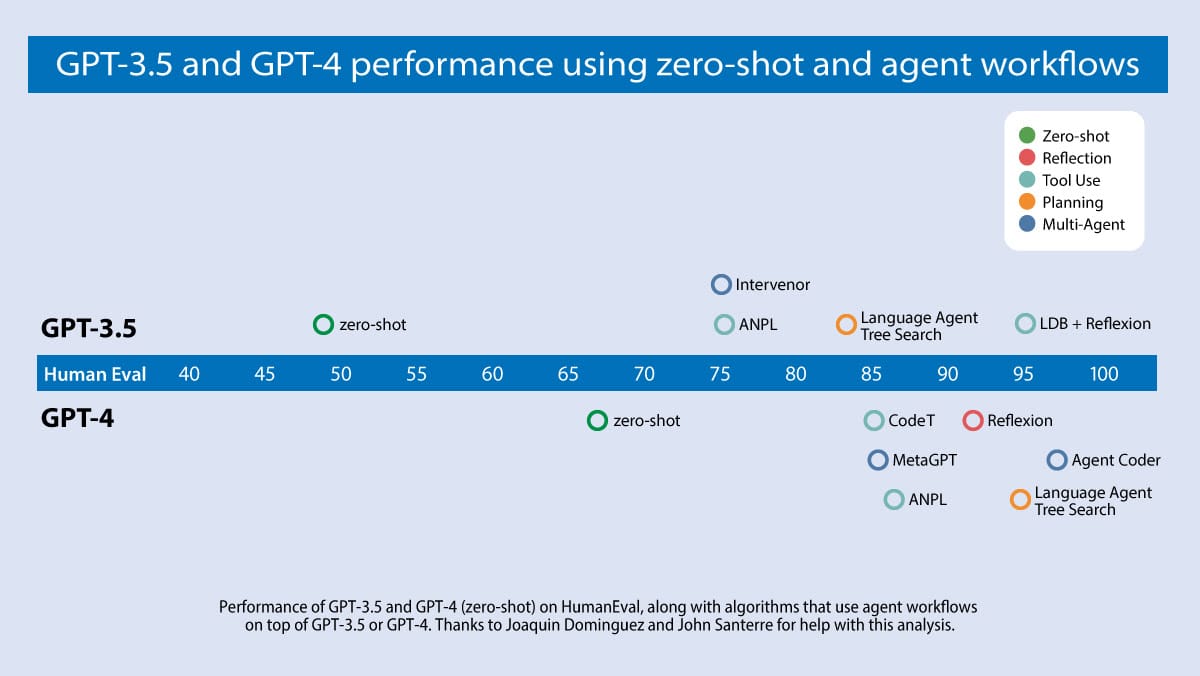
Why does the loop matter so much? Ng's team compared results on the HumanEval coding benchmark: GPT-3.5 zero-shot scored 48.1% and GPT-4 zero-shot scored 67.0%, but GPT-3.5 wrapped in an agent loop reached up to 95.1%. The improvement from the workflow dwarfed the improvement from a newer model.
 Four AI Agent Strategies That Improve GPT-4 and GPT-3.5 PerformanceI think AI agent workflows will drive massive AI progress this year — perhaps even more than the next generation of foundation models. This is an important...
Agentic workflow examples
Four realistic agentic workflow examples, in the same format: trigger, goal, what the model decides, where a human steps in, and why a fixed workflow would not do.
Inbound lead research and qualification
- Trigger: a new form submission.
- Goal: score fit and prepare a reply.
- The model decides: which sources to check, whether the company matches your ideal customer profile, and what the reply should say.
- Human checkpoint: nothing is sent until someone approves the draft.
- Why not fixed: every lead looks different. A rules engine cannot judge whether "Head of Ops at a 40-person logistics startup" is a fit.
Inbound Lead Qualifier
Qualify Inbound Leads
 Clément Janssens

Weekly competitor and pricing watch
- Trigger: a weekly schedule.
- Goal: report only changes that matter.
- The model decides: which changes on competitor sites are meaningful (a new pricing tier) and which are noise (a reworded footer).
- Human checkpoint: a person reads the summary and decides what to act on.
- Why not fixed: a diff tool flags every pixel. Judgment about relevance is the whole job.
SEO content refresh
- Trigger: a page loses rankings or traffic.
- Goal: bring the page back up to date.
- The model decides: what is outdated, what the current search results reward, and which edits to propose.
- Human checkpoint: an editor approves the changes before anything is published.
- Why not fixed: "what to update" changes with every page and every SERP.
Support ticket triage with resolution drafts
- Trigger: a new support ticket.
- Goal: route it and draft a resolution.
- The model decides: the category, the urgency, which help articles and account details are relevant, and how confident it is.
- Human checkpoint: low-confidence tickets escalate to a person, and drafts are reviewed before sending. Our guide to AI agents for customer service covers this use case in depth.
- Why not fixed: customers do not write tickets in your category taxonomy.
The counter-example: a task that should stay fixed
"Copy every new Stripe payment into a Google Sheet" sounds like a job for an agent. It is not. There is no judgment involved, the input is perfectly structured, and a wrong row is a bug, not a gray area. A fixed workflow does it faster, cheaper and with zero variance. If a task has no decision in it, adding a model only adds cost and risk.
When to use an agentic workflow (and when not to)
Anthropic's advice is blunt: find "the simplest solution possible, and only [increase] complexity when needed. This might mean not building agentic systems at all." Here is how to apply that in practice.
A 5-question decision checklist
The fifth question is the one teams skip. An agentic workflow without run logs is a black box that happens to be useful most of the time, which is the worst kind, because nobody notices the day it is not.
Signs you have over-engineered it
- An agent loop runs on a task with zero decisions in it.
- Token spend climbs every month while output quality stays flat.
- Nobody on the team can explain why the workflow did what it did last Tuesday.
- The vendor calls it an "agent," but it is a rebranded chatbot or RPA script. Gartner calls this "agent washing" in the same forecast cited above.
A broken Zap stops. A broken agentic workflow keeps going, confidently. That is why the operating layer matters more than the model.
Running agentic workflows in production: run, watch, approve
Designing the loop is the easy part. Operating it is the hard part. Three questions decide whether an agentic workflow survives contact with real work:
- Run: where does it execute when your laptop is closed?
- Watch: how do you know it did the right thing on run 312, not just in the demo?
- Approve: who signs off before it emails a customer, changes a deal stage or publishes a page?
This is the layer Rerun covers. On Rerun, these agents are called coworkers. A coworker runs 24/7 on its own private cloud machine, on a schedule or a trigger. Every run leaves a log of actions, tool calls, tokens and cost that you can review. Consequential actions pause and wait for a human yes or no, from the app or from Slack, and the coworker resumes exactly where it stopped. Our guide to AI agent guardrails explains why those pauses belong in the design from day one.
What Rerun is not matters just as much:
- Not a framework. You do not write graph code. If you need fine-grained control over every edge of the loop, a framework is the right call, and our LangChain vs LangGraph comparison is a good place to start.
- Not a flowchart builder. Zapier, Make and n8n make you draw every branch, which is ideal at the fixed end of the spectrum. Our Zapier alternatives and n8n vs Make guides cover that ground honestly, and the head-to-head pages for Rerun vs Zapier, Rerun vs Make and Rerun vs n8n show where each one fits.
- Not a chatbot. Coworkers act on a schedule and leave results. They do not wait for you to type, which is the core of the AI agent vs chatbot distinction.
To be clear about the limits: Rerun does not design your agent's reasoning for you, and it does not replace a framework when you need custom loop logic in code. It is the place where a bounded, agentic workflow runs, gets watched and gets approved.
| Operational need | Fixed-workflow tool | Chatbot | Rerun coworker |
|---|---|---|---|
| Runs 24/7 on a schedule or trigger | Yes | Limited | Yes |
| Model decides the next step | No | One turn only | Yes |
| Human approval before risky actions | Manual branch | No | Yes |
| Log of every action, tool call and cost | Step history | No | Yes |
| No flowchart to maintain | No | Yes | Yes |

The short version
Agentic workflows are not a trend to adopt wholesale. They are one setting on a dial. Start at the fixed end. Move right only when the input is messy enough that rules keep breaking and the decision is worth paying a model to make. When you do move right, cap the loop, put a human in front of anything irreversible, and make sure every run leaves a trace.
The teams that land on the right side of Gartner's forecast will not be the ones with the cleverest prompts. They will be the ones who can answer "what did it do, and who approved it?" for every single run.
Frequently asked questions
What is an agentic workflow?
An agentic workflow is a process where the goal and the guardrails are fixed, but an AI model decides the next step at runtime. It plans, calls tools, checks the result and loops until the task is done or a stop condition, such as an iteration cap, a budget or a human approval, is reached.
What is the difference between an agentic workflow and an AI agent?
An agentic workflow is a bounded loop inside a process you still control: the trigger, tools, output and approval points are fixed, and the model only decides within them. An autonomous AI agent owns the whole plan, its tool choices and when to stop. Anthropic describes workflows as following predefined code paths and agents as directing their own process.
Is an agentic workflow the same as AI workflow automation?
No. AI workflow automation often means a fixed workflow with an LLM step inside it, for example a Zap that summarizes an email. The path is still written in advance. A workflow becomes agentic only when the model chooses what happens next, such as which tool to call or whether to retry.
Are agentic workflows the same as multi-agent systems?
Not necessarily. Most agentic workflows use a single model in a loop with tools. Multi-agent collaboration, where several specialized agents split the work, is one pattern an agentic workflow can use, but it adds coordination cost and is only worth it when a task genuinely splits into distinct roles.
Do agentic workflows need a human in the loop?
Any agentic workflow that takes consequential or hard-to-undo actions, like sending emails, changing CRM records or publishing content, should pause for human approval at those points. Low-risk steps such as research and drafting can run unattended, as long as every run is logged and reviewable.
What are examples of agentic workflows?
Common agentic workflow examples include inbound lead qualification with drafted replies, weekly competitor and pricing monitoring, SEO content refreshes on decaying pages, and support ticket triage with resolution drafts. Each involves a judgment call on messy input, which is what separates them from fixed automations.
Do I need to code to build an agentic workflow?
Not always. Frameworks like LangGraph give developers full control over the loop in code. On Rerun, you describe the goal to a coworker, connect your tools, and it runs the workflow on its own private cloud machine, with logs for every run and approval gates before risky actions.
When should I not use an agentic workflow?
Skip it when every step can be written down in advance, the input is perfectly structured, and there is no judgment involved, for example copying each new payment into a spreadsheet. A fixed workflow is faster, cheaper and fully predictable for that kind of task.

Written by
Clément Janssens