Make vs Zapier in 2026: Pricing, AI Features and When an AI Agent Beats Both
Make credits vs Zapier tasks, priced on a real 2026 workflow. Plus Zapier Agents vs Make AI Agents, which tool to pick, and the jobs where an AI agent beats both.
Gartner expects over 40% of agentic AI projects to be canceled by the end of 2027, citing escalating costs, unclear value and weak risk controls. The same release gives the cleanest rule we have found for the Make vs Zapier question: use automation for routine workflows and AI agents when decisions are needed.
That rule matters more in 2026 than it did a year ago, because both tools rewrote their billing for the AI era. Make moved from operations to credits in August 2025, with AI tokens converted into credits. Zapier now draws AI steps, code and MCP calls from one shared task pool, and bills its Agents product on a separate meter. Most Make vs Zapier comparisons you will find still describe last year's pricing.
This guide gives you the 2026 picture: what each plan costs, how each meter counts, one workflow priced on both, an honest AI feature comparison, and a clear decision. It also covers the case where neither tool is the right answer.
In a hurry? Jump to which one to choose, or try a coworker free for 5 days if your workflow already needs judgment.
The quick answer
Choose Zapier if you want the largest app catalog (9,000+ apps) and the simplest linear builder. Choose Make if you need branching, loops and data transformation at a lower cost per step (from $9 a month billed yearly for 10,000 credits). If the work needs judgment rather than fixed steps, an AI agent with approvals usually fits better than either.
Both are good products. They solve the same problem, moving data between apps on a schedule or a trigger, with different philosophies. If you are also weighing a self-hosted option, our n8n vs Make and n8n vs Zapier comparisons cover that ground, so this article stays strictly on the Make vs Zapier pair.
Make vs Zapier at a glance
Make is the former Integromat, renamed in 2022 and now part of Celonis. Zapier has been the default name in no-code automation for over a decade. Here is how they line up in October 2026, based on each vendor's public pricing pages.
| Zapier | Make | |
|---|---|---|
| Builder style | Linear, step by step (Zaps) | Visual canvas (scenarios) |
| App catalog (vendor claim) | 9,000+ apps | 3,500+ apps |
| Free plan | 100 tasks a month, two-step Zaps | 1,000 credits a month, 15-minute interval |
| Entry paid plan | $19.99/mo billed yearly, 750 tasks | $9/mo billed yearly, 10,000 credits |
| Billing unit | Task (each successful action) | Credit (each module action, plus AI tokens) |
| Free steps | Triggers, Filter, Paths, Formatter, Delay, Looping | Routers, error handlers |
| Branching and loops | Paths, simpler logic | Routers, iterators, aggregators |
| Team seats | 1 on Professional, 25 on Team | Teams plan with team roles |
| AI agents | Zapier Agents (separate activity meter) | Make AI Agents (billed in credits) |
| MCP support | Zapier MCP (2 tasks per tool call) | Make MCP server |
| Best for | Breadth, speed, non-technical teams | Complex logic, data shaping, cost at scale |
The short version: Zapier sells reach and ease, Make sells control and price per step.
Make vs Zapier pricing in 2026: credits vs tasks
Price pages compare badly because the two tools count different things. A "task" and a "credit" are not the same unit, so the sticker price only tells you half the story.
How Zapier counts tasks
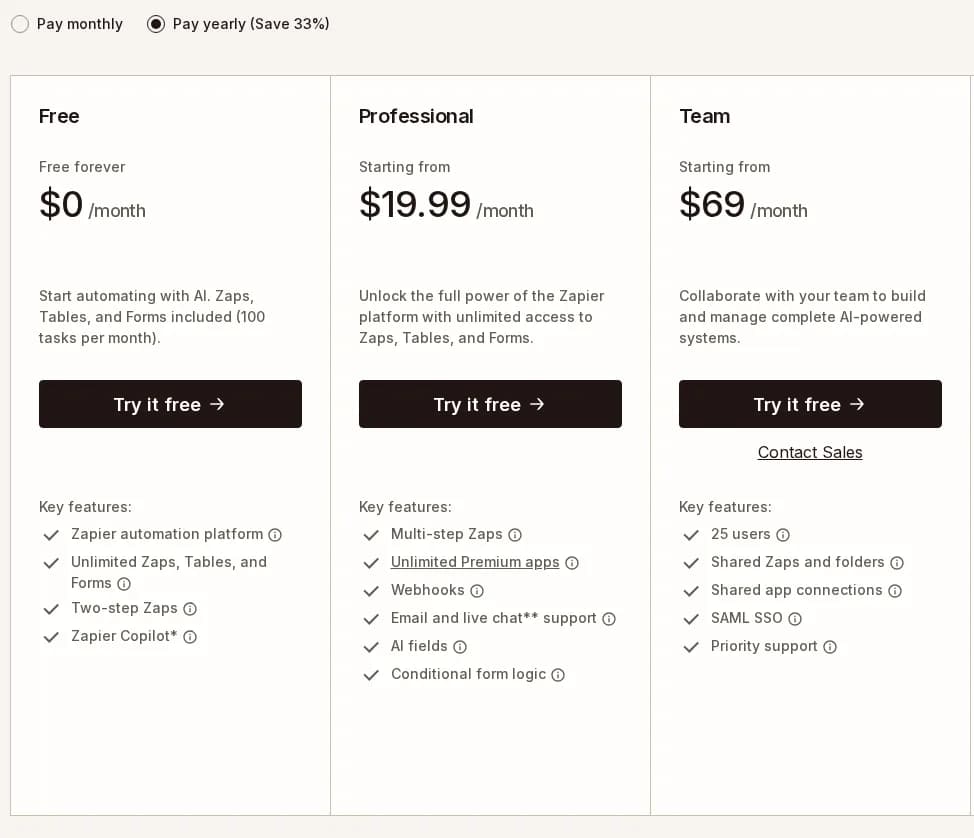
According to Zapier's help center article on how task usage is measured, a task is any successful action step. Triggers never cost tasks, even when they poll every two minutes. Filter, Paths, Formatter, Delay, Looping, Digest, Storage, Tables and Forms steps are also free.
The AI-era changes sit in the exceptions:
- AI by Zapier steps cost a number of tasks that depends on the model tier you pick.
- Code by Zapier costs 1 task per run on standard runtime, more on extended runtime.
- Zapier MCP costs 2 tasks per successful tool call.
- Lead Router costs 5 tasks per lead routed.
- Zapier Agents do not use tasks at all. They run on a separate activity quota.
When you hit your plan limit, Zapier switches you to pay-per-task billing, up to 3x your plan's task limit. After that, new Zap runs are held until the billing cycle resets.
How Make counts credits
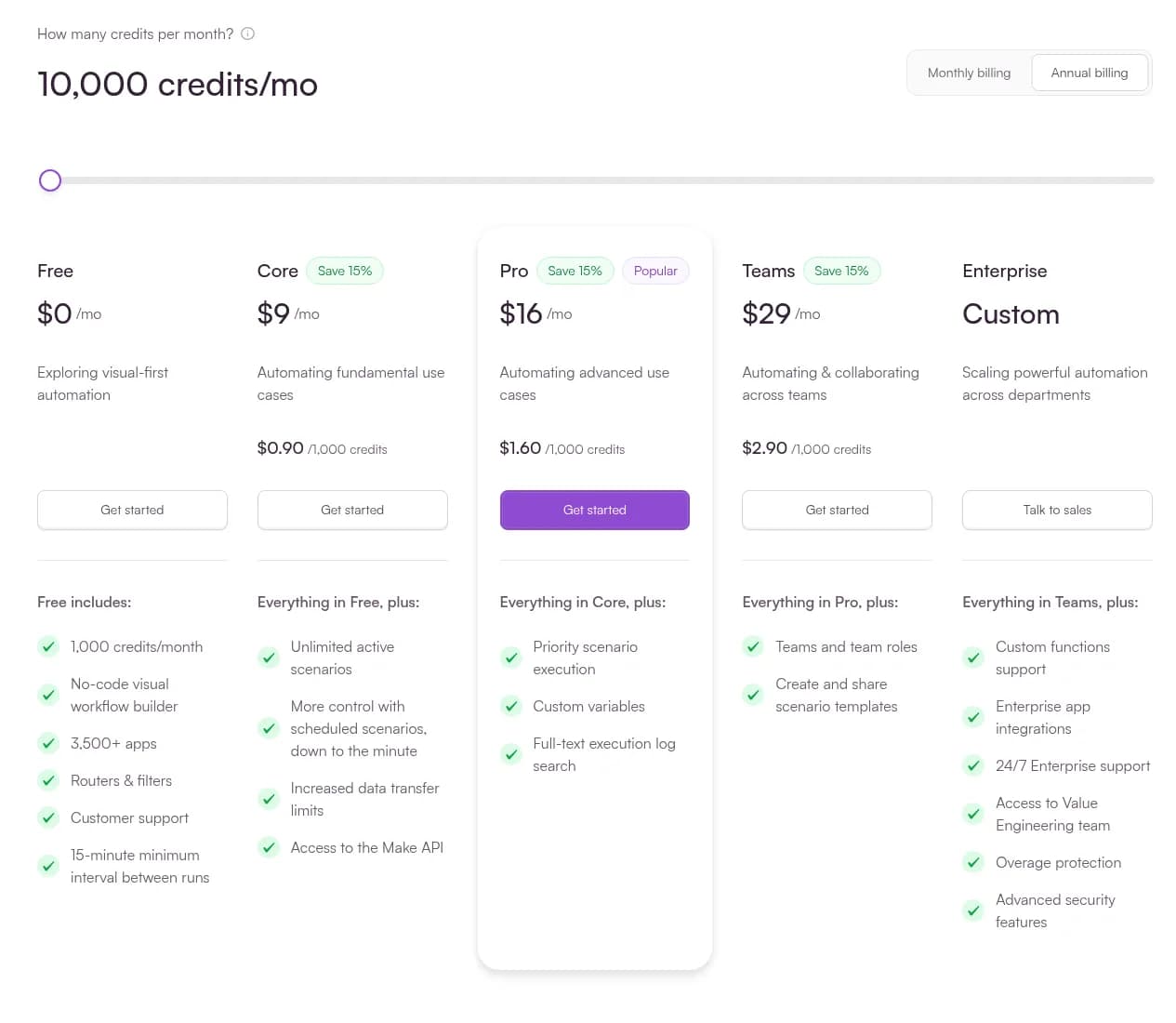
Make's credits documentation is explicit: for non-AI apps, 1 operation equals 1 credit. Reading a record, writing a row and posting a message each cost one credit. Routers and error handler modules (Rollback, Break, Resume, Commit, Ignore) are free.
AI is where Make's meter gets interesting. If you use Make's AI Provider inside Make AI Agents or the AI Toolkit, credits are calculated from the operation plus the tokens consumed, and the conversion rate depends on the model. With your own API key (paid plans), Make bills only the operation and your AI provider bills the tokens directly.
When you run out of credits, scenarios stop until credits are added. Incoming webhooks queue up to your storage limit, and you can buy extra credits in bundles or switch on auto-purchase on Core, Pro and Teams.
Plan prices side by side
| Tier | Zapier (billed yearly) | Make (billed yearly, 10,000 credits) |
|---|---|---|
| Free | $0, 100 tasks/mo | $0, 1,000 credits/mo |
| Entry | Professional from $19.99/mo ($29.99 monthly), 750 tasks | Core $9/mo |
| Mid | Higher Professional task tiers | Pro $16/mo (priority execution, full-text log search) |
| Team | Team from $69/mo, 25 users, SAML SSO | Teams $29/mo, team roles, shared templates |
| Enterprise | Custom, unlimited users, annual task limits | Custom, overage protection, 24/7 support |
Make shows a "Save 15%" badge for annual billing. Zapier shows "Save 33%". Both scale price with volume, so move the task or credit slider to your real usage before you compare.
Worked example: the same workflow on both meters
Here is a lead-routing workflow we priced on both tools: a webhook receives a form submission, a filter drops spam, a formatter cleans the fields, an AI step classifies the lead, the CRM gets a new record, Slack gets an alert, and a router sends enterprise leads down a separate branch. It runs 1,000 times a month.
Assumptions: 1,000 runs/month. AI prompt ~1,500 input tokens, ~50 output tokens.

ZAPIER (tasks)
  Webhook trigger ............ 0   (triggers are free)
  Filter ..................... 0   (free)
  Formatter .................. 0   (free)
  AI classify ................ 1+  (depends on model tier)
  Create CRM record .......... 1
  Slack alert ................ 1
  Paths branch ............... 0   (free)
  ≈ 3 tasks/run  →  ≈ 3,000 tasks/month
  750 and 2,000-task tiers are too small → Professional 5,000 tasks:
  $89/mo billed yearly ($133.50 monthly)

MAKE (credits, Make's AI Provider)
  Webhook module ............. 1
  Filter ..................... 0   (filters between modules are free)
  Set/format fields .......... 1
  AI classify, GPT-5 mini .... 1 op + ~0.5 credit of tokens
  Create CRM record .......... 1
  Slack alert ................ 1
  Router ..................... 0   (free)
  ≈ 5.5 credits/run  →  ≈ 5,500 credits/month  →  fits Core (10,000)

  Same scenario, AI step on Claude Opus 5 via Make's AI Provider:
  1,500 / 180 + 50 / 36  ≈ 9.7 credits for the AI step alone
  ≈ 15 credits/run  →  ≈ 14,700 credits/month  →  over the 10,000 tier
Three things jump out. First, Make is far cheaper for this deterministic workflow: about $9 a month on Make Core against $89 a month for the Zapier Professional tier that holds 3,000 tasks, both billed yearly. You could also sit on Zapier's 2,000-task tier ($49 a month billed yearly) and pay for the extra 1,000 tasks at pay-per-task rates. Second, Zapier's free steps (triggers, filters, formatting) close part of the gap for simple Zaps. Third, the model choice moves Make's bill more than the workflow design does: the token rates in Make's credits documentation go from 18,080 input tokens per credit on GPT-5 nano to 180 on Claude Opus 5, a 100x spread.
 Credits - Help CenterUnderstand how credits work in Make, how different features consume them, and how to monitor your usage
 help.make.com
Your numbers will differ. Rerun the math with your own run count and prompt size, and check both pricing pages on the day you buy.
Costs that are not on the pricing page
- Seats. Zapier Professional is a single seat. Collaboration starts on Team at $69 a month. Make's Teams plan adds team roles at $29 a month.
- Polling speed. Free plans on both tools check for new data every 15 minutes. Paid plans go down to 1 or 2 minutes.
- Overage behavior. Zapier keeps running on pay-per-task up to 3x your limit. Make stops scenarios until you add credits.
- Maintenance time. Every new edge case is a new path, filter or router. The hours you spend fixing broken mappings never show up on an invoice, but they are usually the largest cost.

AI features compared: Zapier Agents vs Make AI Agents
Both vendors now call themselves AI platforms. Zapier's pricing page opens with "AI orchestration plans", and Make's product menu lists AI agents, agentic automation and an MCP server. Here is what is actually inside.
Zapier's AI stack
- Zapier Copilot builds Zaps from a plain-language description. It is included on the Free plan with limits.
- AI by Zapier steps run a model inside a Zap, billed in tasks by model tier.
- AI fields in Tables, from the Professional plan.
- Zapier Agents, a separate product with its own activity quota that does not touch your task allowance. If you run Zaps and Agents, you pay for both.
- Zapier MCP and the Zapier SDK, which let outside AI clients and coding agents call actions across Zapier's catalog, at 2 tasks per MCP tool call.
- A Human in the Loop step that pauses a Zap until a reviewer answers or the timeout runs out.
Make's AI stack
- Maia, Make's conversational assistant for building scenarios.
- Make AI Agents, billed in credits through Make's AI Provider or through your own API key.
- Make AI Toolkit, AI Web Search and AI Content Extractor modules, some of which bill by tokens, pages or file size.
- Make MCP server, so AI clients can trigger your scenarios as tools.
- Make Grid, a map of every scenario, app and AI dependency across your organization.
The catch: AI as a metered step inside a flowchart
Both stacks are impressive, and both share one design choice. The AI lives inside a workflow you still design and debug by hand. The agent decides within a box, and you maintain the box.
That has two consequences. Costs become harder to predict, because tokens and activities sit on top of tasks and credits. And the brittleness of the flowchart does not go away: a renamed column or a new email format still breaks the step after the AI. For the bigger picture on where AI fits in automation, our guide to AI workflow automation goes further than this comparison should.
A broken Zap stops. A broken scenario stops. An AI step that guesses wrong keeps going, confidently. That is why the question in 2026 is no longer only "which builder", but "who checks the decision".
Ease of use, integrations and reliability
Ease of use. Zapier is the easier first week. You pick a trigger, add actions one after another and map fields in a form. Make's canvas shows the whole scenario as connected bubbles, which is clearer for complex logic and more intimidating on day one. Most teams describe Make as "harder to learn, easier to scale".
Integrations. Zapier claims 9,000+ apps, Make claims 3,500+ apps on its pricing page. For mainstream tools (Gmail, Slack, HubSpot, Sheets, Notion, Stripe) both are covered. The gap shows up on niche vertical software, where Zapier is more likely to have a native connector. Both support webhooks and custom HTTP calls for everything else.
Reliability and error handling. Make's dedicated error handler modules (Rollback, Break, Resume, Commit, Ignore) give finer control over what happens when a step fails. Zapier offers error handler paths, custom error notifications and Zap version control on paid plans. On Enterprise, Zapier adds observability features and usage alerts.
Make vs Zapier: which should you choose?
Choose Zapier if…
Choose Make if…
If you are leaning away from both, our list of Zapier alternatives for AI agent automation covers the wider field.
Choose neither if…
The work itself needs judgment. Reading a reply and deciding whether it is a yes, a maybe or an objection. Checking an invoice against a contract. Qualifying a lead from a messy email thread. Those jobs do not fit a flowchart, however clever its AI step.
When an AI agent beats both
Signs you have outgrown flowcharts
- Inputs are unstructured. Emails, PDFs, web pages and chat threads, not clean form fields.
- Every edge case is a new branch. Your scenario has more routers than actions.
- Maintenance eats the savings. You spend more time fixing mappings than the automation saves.
- The AI bill is a surprise. Token or activity costs swing from month to month.
What to demand from an AI agent setup
Whatever vendor you pick, hold it to this list. These are the controls that separate a production agent from a demo, and they map directly to the "inadequate risk controls" Gartner warns about.
| Requirement | Why it matters | Zapier and Make today | Status |
|---|---|---|---|
| You can watch it work | Every action, tool call and decision is visible as it happens | Run history, mostly after the fact | Partial |
| It asks before consequential actions | Refunds, client emails and deletions wait for a human | A review step you place in the flow yourself | Partial |
| Its workspace is isolated | Files, scripts and data persist in one private environment | No persistent machine between runs | No |
| Pricing does not count every step | Cost stays flat as the agent works more | Tasks, credits or activities per action | No |
| It still uses your apps and MCPs | No rip-and-replace of the tools your team relies on | Very large app catalogs | Yes |
Our guides to human-in-the-loop AI agents and AI agent observability go deeper on the first two rows.

Where Rerun fits, and where it does not
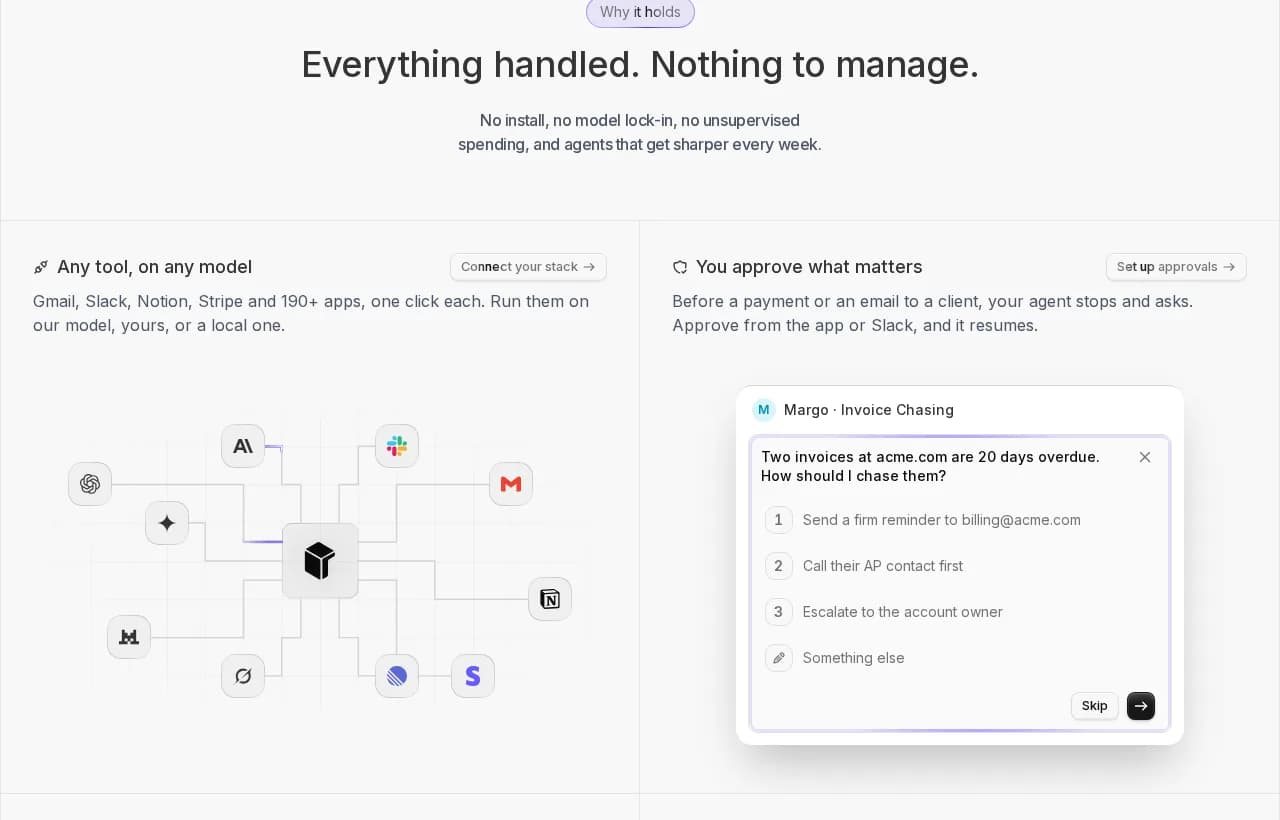
Rerun is the operations layer for AI agents you can watch work. On Rerun, these agents are called coworkers. You pick one from the library or describe the job in a sentence, connect your apps (200+ apps plus any MCP or API), and the coworker works out the steps on each run, on your workspace's own private machine in the cloud.
The controls from the checklist are built in. A coworker can pause to ask you a question or request your approval before it acts, and Autopilot can answer within the rules you set, never for spending or deleting. Every action shows up live for your whole team, with unlimited seats.
Pricing is the opposite of a meter: one plan from $29 a month for 5 coworkers, with 500 model credits included each month, the option to run on your own AI key or your ChatGPT or Claude plan, and no counting of runs or steps. There is a 5-day free trial.
Here is the honest part. Rerun is the wrong tool for fixed, high-volume app-to-app triggers. Copying every form entry into a sheet thousands of times a day is exactly what Zapier and Make are built for, and they have far larger integration catalogs. Keep them for that. Bring in a coworker for the work that needs a decision. If you want the full head-to-head, read Rerun vs Zapier and Rerun vs Make.
Can you use Make or Zapier with an AI agent?
Yes, and it is often the best setup. Let Zapier or Make handle the deterministic plumbing (the trigger, the sync, the copy), and hand the judgment step to an agent. Both tools expose MCP, the open protocol AI agents use to call tools, so an agent can trigger a Zap or a scenario as one of its actions. Our explainer on the Model Context Protocol covers how that wiring works. Just budget for it: on Zapier, each MCP tool call costs 2 tasks.
For the lead-routing example above, that split looks like this: the form webhook and the CRM sync stay in your automation tool, while a coworker reads the lead's email thread, qualifies it, drafts the reply and asks you before booking the call.
Inbound Lead Qualifier
Qualify Inbound Leads
 Clément Janssens

Set it up once, and every new lead gets read, scored and answered without another branch in your scenario.
Make vs Zapier: the verdict
So, Zapier vs Make in one line each.
Zapier wins on reach and ease. If your team is non-technical, your workflows are linear and you need a niche connector, it is still the safest pick.
Make wins on logic and price per step. If your workflows branch, loop and reshape data at volume, Make's credits go further, as long as you watch which AI model you choose.
Neither is built for work that needs judgment. When the job is reading, deciding and acting, a coworker you can watch and approve does what a flowchart cannot, at a flat price.
Frequently asked questions
Which is better, Make or Zapier?
Zapier is better if you want the largest app catalog and the fastest way for a non-technical team to build linear automations. Make is better if your workflows branch, loop and reshape data, or if you run high volumes where cost per step matters. In the Zapier vs Make choice, neither is designed for work that needs judgment, where an AI agent with approvals fits better.
Is Make cheaper than Zapier?
Usually, yes, for multi-step workflows. Make's Core plan costs $9 a month billed yearly for 10,000 credits, while Zapier's Professional plan starts at $19.99 a month billed yearly for 750 tasks. Zapier narrows the gap because triggers, filters, paths and formatting steps are free, and Make's bill can climb quickly if you run premium AI models through Make's AI Provider.
What is the difference between Make credits and Zapier tasks?
A Zapier task is one successful action step, and triggers, filters, paths and formatter steps cost nothing. A Make credit is consumed by each module action, including the trigger module, while routers and error handlers are free. AI steps change both meters: Zapier bills AI by model tier in tasks, and Make converts AI tokens into credits at a rate that depends on the model.
Is Make better than Zapier for AI agents?
Neither is clearly better. Make AI Agents bill in credits and let you choose between Make's AI Provider and your own API key, which gives more cost control. Zapier Agents run on a separate activity quota on top of your task plan. In both tools the agent lives inside a workflow you still design and maintain, so for work that needs judgment a dedicated AI agent setup with approvals is often a better fit.
Are Make and Zapier the same company?
No. Make is the former Integromat, renamed in 2022 and owned by Celonis. Zapier is an independent company. The two are direct competitors in no-code automation.
Do Zapier Agents cost extra?
Yes. Zapier Agents use a separate activity quota that does not count against your Zap tasks, so if you run both Zaps and Agents you pay for both. There is a free Agents tier with a monthly activity allowance and paid tiers for higher usage.
Is Make harder to learn than Zapier?
Most people find Make harder in the first week and easier at scale. Zapier's linear editor is quicker for simple trigger and action flows. Make's visual canvas takes longer to learn but makes branching, loops and data transformation easier to read and maintain.
Can Make and Zapier work with an AI agent?
Yes. Both expose MCP, so an AI agent can call a Zap or a Make scenario as one of its tools. A common setup keeps deterministic triggers and syncs in Zapier or Make and hands the judgment step, like qualifying a lead or answering an email, to an agent. On Zapier, each MCP tool call costs 2 tasks.
What is the best alternative to Make and Zapier for AI agents?
It depends on the job. For fixed, high-volume app-to-app triggers, Make and Zapier remain the right tools. For work that needs decisions, look for an AI agent platform where you can watch every action, approve consequential steps and pay a flat price. On Rerun, these agents are called coworkers: one plan from $29 a month covers 5 coworkers on a private cloud machine, with no counting of runs or steps.

Written by
Clément Janssens