Cursor vs Claude Code: IDE Agent or Terminal Agent? (2026 Comparison)
Cursor vs Claude Code in 2026: an IDE agent you steer diff by diff, or a terminal agent you hand whole tasks to. Features, cloud agents, context, MCP and October 2026 pricing compared, with a clear verdict.
Coding assistants and agents are now the number one use of AI among developers (66%), and 73% of those users rely on one every day, according to the Stack Overflow 2026 Developer Survey. Claude Code leads the coding agent category at 66% usage. Cursor remains the AI editor most teams start with. So the Cursor vs Claude Code question is no longer "which one is smart enough". It is "which one fits the way I want to work".
The short answer: Cursor is an AI-first code editor, built on VS Code, where you steer an agent through inline diffs you review line by line. Claude Code is Anthropic's terminal-first coding agent that plans and executes whole tasks while you review the outcome. Choose Cursor for hands-on editing and model choice. Choose Claude Code for delegated, multi-file work. Plenty of teams run both.
Last verified: October 12, 2026, against both vendors' pricing pages, docs and changelogs.
A lot changed this year. SpaceX closed its $60 billion acquisition of Cursor's maker Anysphere in August, Grok models now sit inside Cursor's own model pool, and Claude Code spread from the terminal to desktop, web, mobile and Slack. If you are comparing Claude Code with OpenAI's agent instead, our Claude Code vs Codex comparison covers that matchup. This article stays on Cursor and Claude Code.
Cursor vs Claude Code at a glance
Whether you search it as Cursor vs Claude Code or Claude Code vs Cursor, these are the differences that matter in October 2026.
| Cursor | Claude Code | |
|---|---|---|
| What it is | AI-native code editor (VS Code fork) | Agentic coding tool, terminal-first |
| Default posture | You drive, the agent assists | You delegate, the agent drives |
| Where you use it | Desktop editor, CLI, web, iOS, Slack | Terminal, VS Code and JetBrains extensions, desktop, web, iOS, Android, Slack, GitHub Actions |
| Models | Anthropic, OpenAI, Google, Grok, Composer and more | Anthropic models only |
| Tab autocomplete | Unlimited on paid plans | Not its job |
| Plan before acting | Planning mode | Plan mode |
| Long autonomous runs | Cloud agents and Projects | Auto mode by default, Projects |
| Headless and CI | CLI with headless mode | CLI and GitHub Actions |
| MCP, skills, hooks | Yes | Yes |
| Built-in code review bots | Bugbot, Security Review | Through GitHub workflows |
| Entry price | $20/mo (Pro) | $20/mo, or $17/mo billed annually (Claude Pro) |
| Power-user price | $200/mo (Ultra) | $200/mo (Max 20x) |
| Owner | Anysphere, a SpaceX subsidiary | Anthropic |
TL;DR verdict:
- Pick Cursor if you write code all day, love Tab completion, and want to approve every change in a visual diff.
- Pick Claude Code if you hand off whole tasks (migrations, refactors, issue-to-PR work) and review the result.
- Pick both if you can afford it: the Claude Code extension runs inside Cursor, so you can keep Cursor's editor and still delegate the big jobs.
What is Cursor in 2026?
An AI-native editor built on VS Code
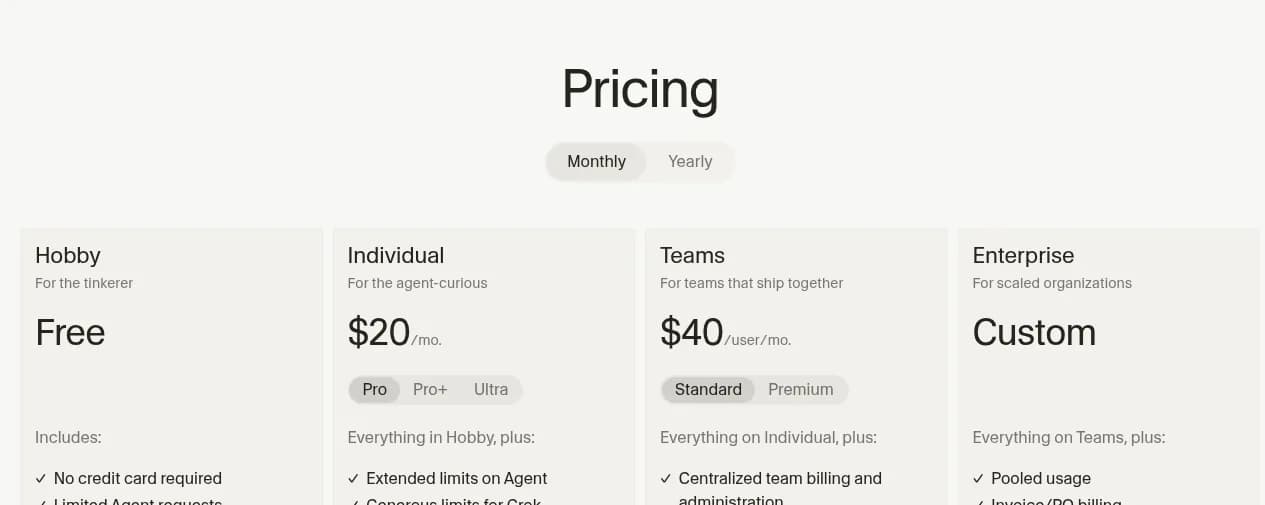
Cursor started as a fork of VS Code, so your extensions, keybindings and themes carry over. On top of that it adds Tab (multi-line autocomplete that predicts your next edit), an Agent that can read and change files across the repo, and a dedicated Agents Window to run several agents side by side. The docs list specialised modes for planning, debugging and a visual Design Mode for front-end work.
The defining trait is control. Every change the agent proposes shows up as a diff inside the editor, and you accept or reject it hunk by hunk.
Cloud agents, Projects and remote control
Cursor no longer needs your laptop open to work. Cloud agents run in isolated environments and can be started from the web, Slack or the mobile app. In September, Cursor shipped self-hosted machines (so tool execution stays inside your network) and Projects, a beta where a coordinator agent plans a larger body of work and delegates it to subagents running in the cloud. On October 6 it added remote control, so you can see and reply to agents running on your own computer from the iOS app.
There is also a Cursor CLI with a shell mode and a headless mode for CI. For teams, Bugbot reviews pull requests, and the changelog shows two newer bots on Teams and Enterprise: Rollouts, which watches a change as it deploys, and Security Review, which reports exploitable bugs on every PR.
The SpaceX factor
SpaceX agreed to buy Anysphere in June in an all-stock deal reported by Reuters at $60 billion, and the deal closed on August 14, folding Cursor into a SpaceXAI division. The visible product effect so far: Cursor's own "Cursor Models" pool now contains Grok 4.7, 4.6 and 4.5 alongside Cursor's Composer 2.5, with more included usage than third-party models. Claude, GPT and Gemini models are all still available. For most developers this changes nothing day to day. For enterprise buyers with vendor-risk reviews, it is a new line on the checklist.
What is Claude Code in 2026?
Terminal-first, but no longer terminal-only
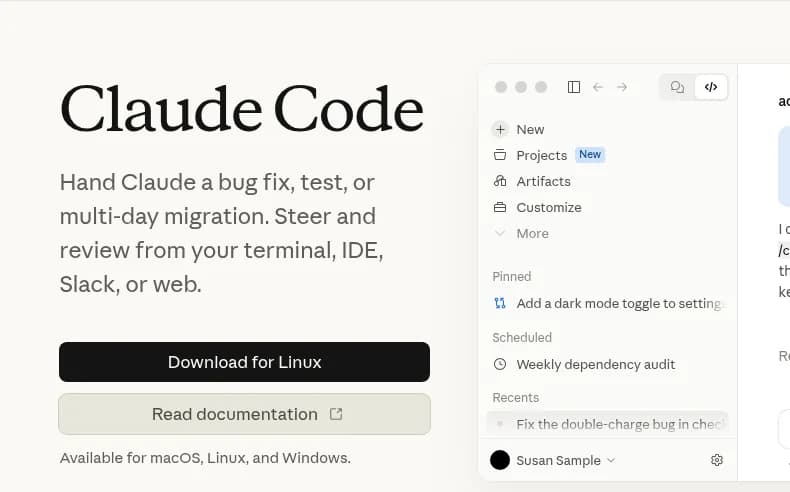
Claude Code began as a command-line agent you install with one curl command. It still feels most at home there: you describe a task, it searches the codebase on its own, proposes a plan, edits files, runs your tests and commands, and opens a pull request. It reads project conventions from a CLAUDE.md file at the repo root.
Today the same agent runs in a VS Code extension that also works in Cursor, in JetBrains IDEs, in the Claude desktop app, on the web, on iOS and Android, in Slack and in GitHub Actions.
What shipped this year
Anthropic's own feature feed lists four big 2026 launches:
- Artifacts (June 18): preview in-progress work as a live, interactive artifact and share it.
- Self-hosted environments (August 6, public beta): run Claude Code sessions on your own infrastructure, next to internal services.
- Auto mode by default (August 7): on Pro, Max and Team plans Claude Code now works longer without asking, while still catching risky commands.
- Projects (September 17): group related coding sessions so you can run and supervise several Claude agents at once from Claude Code Desktop.
Anthropic models only
Claude Code runs Claude models: Fable 5.1, Opus 5.5, Sonnet 5.5 and Haiku 5.5, with a context window of up to 1M tokens depending on the model. A fast mode makes Opus 5.5 up to 2.5x faster at a higher per-token price. You cannot point it at GPT or Gemini. For many teams that is fine, because Claude models are what they would pick in Cursor anyway. For teams that like to switch models per task, it is a real limit.

IDE agent vs terminal agent: the real difference
Here is the part most Cursor vs Claude Code comparisons miss. The model is no longer the dividing line. Cursor can run Claude Opus 5.5. Claude Code's extension runs inside Cursor. Both have a CLI, cloud execution, Projects and mobile control. What actually separates them is where you supervise the agent, and how often.
An IDE agent asks you to approve the next edit. A terminal agent asks you to approve the finished work. Neither is safer by default. They just put the human checkpoint in different places.
Who drives: you or the agent
In Cursor, the rhythm is short loops. You prompt, the agent proposes, you read the diff, you accept or adjust, and you keep typing yourself in between. You stay the author of the code, with a very fast assistant.
In Claude Code, the rhythm is long loops. You write a brief, the agent plans, you approve the plan, and then it works through files, commands and tests on its own. You come back to review a branch or a pull request. You become the reviewer of the code.
That matches what the Stack Overflow survey found: 48% of developers trust AI when they can easily validate the answer, and human-in-the-loop is the dominant way people work with these tools. Cursor puts validation on every hunk. Claude Code puts it at the plan and at the PR.
The review loop
| Review step | Cursor | Claude Code |
|---|---|---|
| Before work starts | Optional planning mode | Plan mode, then approval |
| During the work | Inline diffs, hunk by hunk | Permission prompts on risky commands |
| After the work | Agent Review, Bugbot on PRs | Tests run by the agent, then your PR review |
| Visual check of UI changes | Design Mode, live preview | Artifacts, less pixel-level control |
Where each one breaks down
Cursor struggles when the task is bigger than your attention span. A multi-hour migration across 80 files means 80 files of diffs to approve, or a switch to cloud agents and Projects, which is a different workflow than the editor most people bought Cursor for.
Claude Code struggles when the task is small and visual. Nudging a button 4 pixels left is faster to do by hand in an editor than to describe in a terminal. And because it acts more on its own, a vague brief produces confident work in the wrong direction. The quality of your brief is the quality of your result.
If you want to test this on your own codebase rather than trust anyone's opinion, run the same task in both tools and score it:
Feature-by-feature comparison
Agent modes and autonomy
Cursor gives you an Agent plus dedicated modes for planning, debugging and design work, and the Agents Window to run several at once. Claude Code gives you a plan mode, a default auto mode that keeps working while blocking risky commands, and explicit permission prompts before it edits files or runs commands outside what you allowed.
If you hand Claude Code a migration, a good brief looks like this:
{
  "goal": "Migrate all API handlers in /src/api from callbacks to async/await",
  "constraints": [
    "Do not change public function signatures",
    "Keep existing error codes and log messages",
    "No new dependencies"
  ],
  "definition_of_done": [
    "npm test passes with zero skipped tests",
    "npm run lint returns no errors",
    "One commit per handler file, with a clear message"
  ],
  "checkpoints": [
    "Show me the plan before editing any file",
    "Stop and ask if a handler has no test coverage"
  ]
}The same brief works in a Cursor cloud agent. The difference is what happens next: Cursor keeps surfacing diffs in the editor, Claude Code keeps going until the definition of done is met or a checkpoint stops it.
Background and cloud agents
This used to be Claude Code's clear advantage and Cursor's gap. Not anymore. Cursor cloud agents run off your machine, and Cursor Projects keep a coordinator working when your laptop is closed. Claude Code runs on the web, from mobile, in GitHub Actions and in self-hosted environments, and its Projects feature lets you supervise several agents at once. If the idea of agents that keep working while you are away is new to you, our explainer on background agents covers the pattern and its risks.
CLI, headless and CI
Both tools now have a real command line. The Cursor CLI supports a shell mode, ACP and headless runs for CI. Claude Code is a CLI at heart and plugs into GitHub Actions for issue-to-PR automation. For a team that already lives in the terminal, Claude Code still feels more native. For a team that lives in the editor, Cursor's CLI is a bonus rather than the main event.
Context handling
Cursor leans on context you direct: @ mentions of files and docs, project rules, and indexing of your repo. Claude Code leans on agentic search, reading the codebase itself to decide what matters, plus your CLAUDE.md instructions. In practice, Cursor rewards developers who know exactly which files matter, and Claude Code rewards developers who write good project instructions.
# CLAUDE.md (repo root, read by Claude Code at the start of every session)
- Run `pnpm test` before declaring any task done
- Never edit files in /generated, they are rebuilt by codegen
- API errors use the AppError class in /src/errors.ts
Cursor's equivalent lives in project rules, which you can scope to folders or file types.
MCP, skills, hooks and plugins
Both support the Model Context Protocol, which Anthropic created, so either tool can reach your issue tracker, database or docs through an MCP server. Both support skills, hooks, subagents and plugins. If those words are fuzzy, our guides to agent skills and subagents explain what each one adds. Cursor Enterprise adds admin controls over which repositories, models and MCP servers people can use.
Model choice
This is Cursor's cleanest win. It routes across Anthropic, OpenAI, Google, Grok and its own Composer models, with an Auto router on Teams and Enterprise. Claude Code is Anthropic-only. If you want Opus 5.5 for architecture and a cheap model for boilerplate, Cursor lets you switch per request. Claude Code lets you switch between Claude models only.
Code review
Cursor ships review bots in the product: Bugbot on PRs, plus Security Review and Rollouts on Teams and Enterprise. Claude Code does review through GitHub Actions and your own workflows. Both approaches work. Cursor's is more turnkey, Claude Code's is more scriptable.
 AI 2026 | Stack Overflow Developer SurveyHow are technologists using AI?
Cursor vs Claude Code pricing (October 2026)
Prices below are taken from the Cursor models and pricing docs and Claude's pricing page on October 12, 2026, in US dollars before tax.
Individual plans
| Plan | Cursor | Claude Code (via a Claude plan) |
|---|---|---|
| Free | Hobby: limited agent requests | Not included in Claude Free |
| Entry | Pro: $20/mo | Pro: $20/mo, or $17/mo billed annually |
| Daily heavy use | Pro Plus: $60/mo | Max 5x: $100/mo, includes $100/mo in API credits |
| Power user | Ultra: $200/mo | Max 20x: $200/mo, includes $200/mo in API credits |
Team and enterprise plans
| Plan | Cursor | Claude Code (via a Claude plan) |
|---|---|---|
| Standard seat | $40/user/mo | $20/seat/mo annual, $25 monthly |
| Premium seat | $120/user/mo (5x Standard agent limits) | $100/seat/mo annual, $125 monthly (5x Standard usage) |
| Enterprise | Custom | $20/seat/mo plus usage at API rates |
How each one bills usage
The sticker prices look similar. The billing models are not.
Cursor gives every paid plan two monthly usage pools: one for Cursor's own models (Grok and Composer) and one for third-party models such as Claude, GPT and Gemini, charged at each model's API price. On Teams and Enterprise, third-party requests also carry a Cursor Token Rate of $0.25 per million tokens. When you run out, you can keep going with on-demand usage at the same rates.
Claude Code has no separate meter on a subscription. It shares one usage pool with everything else you do in Claude, with limits that reset on a rolling five-hour window plus weekly caps. A long coding session and a long chat eat from the same bucket. When you hit the limit you can wait, upgrade, or switch on usage credits at API rates.
What a heavy month actually costs
Cursor's own docs are refreshingly candid: daily agent users typically spend $60 to $100 a month in total usage, and power users running multiple agents often spend $200 or more. On the Claude side, a developer who delegates large tasks every day usually lands on Max 5x at $100, and someone running several agents in parallel on Max 20x at $200. So for heavy users the two converge around $100 to $200 a month. The real difference is predictability: Claude's flat plan caps your bill and throttles your usage, Cursor's on-demand model keeps you working and grows your bill. For a broader view of where agent costs come from, see our breakdown of AI agent cost.
Which one should you choose?
Choose Cursor if...
- You spend most of your day typing code and value Tab completion
- You want to approve every change visually, hunk by hunk
- You switch models depending on the task, or want Grok and Composer in the mix
- You do a lot of front-end work where seeing the result matters
- Your team wants built-in review bots and admin controls in one product
Choose Claude Code if...
- You prefer to describe the outcome and review a finished branch
- Your work includes long migrations, refactors or issue-to-PR jobs
- You live in the terminal or already script your workflow in CI
- You already pay for Claude Pro or Max and want coding included in that bill
- You are happy standardising on Anthropic models
Use both: Claude Code inside Cursor
The pairing many teams settle on: keep Cursor as the editor for Tab, quick edits and visual review, and install the Claude Code extension inside it for delegated tasks. Small changes stay in short loops, big changes go to the agent that likes long ones. You pay for two subscriptions, so it only makes sense once both are earning their keep.
One more pattern worth knowing: the recurring chores around the code (weekly metrics, bug report triage, release notes) do not need a coding agent at all, and that is the one place a different kind of tool earns a slot. We come back to it below.
If you want the wider field rather than this head-to-head, our roundup of the best AI coding agents in 2026 covers the other options. And if what you are really after is an always-on agent rather than a coding tool, the OpenClaw vs Claude Code and Hermès Agent vs Claude Code comparisons are a better starting point.
Claude Code vs Codex: A Hands-On 2026 Comparison of Two Coding Agents
Codex vs Claude Code, compared for real. Local terminal vs cloud sandbox, code quality vs autonomy, real pricing, and the orchestration layer neither CLI gives you.
What about the work that isn't code?
Cursor and Claude Code are built for one job: writing and shipping code. Rerun does not do that job. It is not an IDE, not a terminal agent and not a vibe-coding app builder, and it will not write, review or deploy your code. If code is the work, pick one of the two tools above.
What engineering teams still do by hand is the work around the code: weekly metric reports, bug report triage, competitor monitoring, inbox follow-ups, SEO audits. That is where Rerun fits. On Rerun, the agents that do this work are called coworkers. You pick a coworker from the library or describe the job, and it runs 24/7 on its own private cloud machine. You watch it work live, and it stops and asks for your approval before any action that matters, from the app or from Slack. Our guide to human-in-the-loop AI agents explains why that checkpoint matters.
It is also not a flowchart tool. With Zapier, Make or n8n you draw and maintain every branch, which is why so many teams end up reading our list of Zapier alternatives or comparing Rerun vs Zapier, Rerun vs Make and Rerun vs n8n. With a coworker you describe the outcome. And unlike a chatbot, a coworker does not just answer you, it does the task and reports back, the difference we unpack in AI agent vs chatbot. If you already pay for a Claude plan for Claude Code, you can plug that subscription into Rerun too.
Here is one coworker an engineering lead might hand the Monday numbers to:


SaaS Metrics Digest
Summarize Weekly SaaS Metrics
 Clément Janssens
Set it up once, and the summary lands every week whether or not anyone remembered to pull the dashboards.

The verdict
Cursor vs Claude Code is not a contest between a smart tool and a dumb one. Both are excellent, both run frontier models, both can work in the background. The choice is about supervision. If you want to stay the author and approve each edit, Cursor is the better home. If you want to become the reviewer and hand off whole tasks, Claude Code is the better agent. If you have the budget, run Claude Code inside Cursor and use each for what it does best.
And for the recurring work around your code that neither tool was built for, a coworker you can watch is a calmer answer than another flowchart.
Prices and features change often in this category. We re-check this comparison against both vendors' official pages; if you spot something out of date, tell us at hello@rerun.build.
Frequently asked questions
Is Claude Code better than Cursor?
Neither is better across the board. Claude Code is stronger when you delegate whole tasks such as migrations, refactors or issue-to-PR work and review the result. Cursor is stronger when you write code yourself, want Tab completion and prefer to approve each change as an inline diff. Many developers use both.
Can I use Claude Code in Cursor?
Yes. Anthropic's Claude Code extension for VS Code also works in Cursor, so you can keep Cursor as your editor and run Claude Code inside it for delegated tasks. You need a Claude plan or a Claude Console account for Claude Code, on top of your Cursor plan if you use Cursor's own agent.
Does Cursor use Claude models?
Yes. Cursor can run Claude Fable 5.1, Opus 5.5, Sonnet 5.5 and Haiku 5.5, billed from its Other Models pool at each model's API price. It also offers OpenAI, Google, Grok and its own Composer models. Claude Code, by contrast, only runs Anthropic models.
Which is cheaper for heavy daily use, Cursor or Claude Code?
For heavy users they land in a similar range of about $100 to $200 a month. Cursor's docs say daily agent users typically spend $60 to $100 in total usage and power users $200 or more, with on-demand billing past your plan. Claude Code is included in Claude Max 5x at $100 or Max 20x at $200, with usage limits instead of overage charges.
Do Cursor and Claude Code both support MCP?
Yes. Both support the Model Context Protocol, so either tool can connect to issue trackers, databases and internal docs through MCP servers. Both also support skills, hooks and subagents. Cursor Enterprise adds admin controls over which MCP servers people can use.
Can Cursor or Claude Code run in the background or from my phone?
Both can. Cursor has cloud agents, a Projects beta that keeps working when your laptop is closed, and remote control of local agents from its iOS app. Claude Code runs on the web, on iOS and Android, in Slack, in GitHub Actions and in self-hosted environments, and its Projects feature supervises several agents at once.
Is it worth paying for both Cursor and Claude Code?
Only if both are doing real work for you. A common split is Cursor as the editor for Tab completion, quick edits and visual review, with the Claude Code extension running inside it for long, delegated tasks like migrations and refactors. If you mostly type code yourself, Cursor alone is enough. If you mostly hand off whole tasks, a Claude plan with Claude Code may be enough on its own.

Written by
Clément Janssens