73% of developers who use AI coding assistants or agents now use them every day, and nearly a third of daily AI users spend four or more hours a day with them, according to the Stack Overflow Developer Survey 2026. In the same survey, only 9.6% of respondents say they use an AI answer as-is. So developers lean on these tools heavily and still check what they produce. That gap is where agentic coding lives.
Agentic coding is a way of building software where an AI agent receives a goal rather than a prompt, then plans the steps, edits files, runs commands and tests, reads the results and iterates until the task is done, with a human reviewing the outcome rather than every line.
So what is agentic coding in practice? This guide explains how that loop works, where it breaks, what the evidence says about speed, and how teams keep coding agents under control once they stop watching every keystroke.
In a hurry? The short version: the agent is the easy part, control is the hard part. Run your first coworker with full logs and approvals, free for 5 days.
Key takeaways
- An assistant suggests, an agent acts. Agentic coding hands the AI a task, a repository and tools, not a single prompt.
- The loop is plan, act, verify, hand off. Tests and type checks are what make it work at all.
- Autonomy is a spectrum, from inline autocomplete to cloud agents you check hours later.
- The productivity evidence cuts both ways. Gains are real on scoped, testable tasks and doubtful on large, unfamiliar codebases.
- Control is the real product. Sandboxes, least-privilege tokens, logs and an approval before merge decide whether you can trust the result.
Agentic coding, defined
Classic AI coding help works one turn at a time. You write a prompt or start typing, the model suggests a line or a function, and you decide what to keep. The human drives every step.
With agentic coding, the unit of work changes from a prompt to a task. You say "add rate limiting to the login endpoint and cover it with tests", and the agent figures out which files matter, edits them, runs the test suite, reads the failures, fixes them and comes back with a diff. The model is the same kind of large language model. What changed is that it now sits inside a loop with real tools and the permission to use them.
That is also why the term overlaps with the broader idea of agentic AI: software that pursues a goal across several steps instead of answering once. Coding just happens to be the field where it worked first.
Agentic coding vs AI coding assistants
| AI coding assistant | Agentic coding | |
|---|---|---|
| Input | A prompt or a half-typed line | A task with a goal |
| Scope | One line, one function | The whole repository |
| Tools | None, it only generates text | Files, terminal, tests, search |
| Verification | The human checks everything | Runs its own checks first |
| Output | A snippet you paste | A diff or pull request with a summary |
| Human role | Driver | Reviewer and approver |
Agentic coding vs vibe coding
The two get confused constantly. Vibe coding is a style: Andrej Karpathy coined the term in early 2025 to describe accepting AI-generated code without really reading it and going with the flow. Agentic coding is a mechanism: an agent working through a plan with tools. You can do agentic coding with the rigor of a senior engineer (specs, tests, review) or with the carelessness of vibe coding. The mechanism does not decide that. Your process does.
How a coding agent works: the plan, act, verify loop
Every serious coding agent, whether it lives in your terminal, your IDE or a cloud sandbox, runs some version of the same four-step loop. If you have read about ReAct agents, this is that pattern applied to a codebase.
1. Plan
The agent reads the task, explores the repository (file tree, relevant modules, existing tests, conventions) and breaks the work into steps. Good agents write the plan down before touching code, which gives you an early chance to catch a wrong assumption. We cover the mechanics of this step in depth in our guide to AI agent planning.
2. Act with tools
Then it does the work: reads and writes files, runs shell commands, installs dependencies, searches the codebase and sometimes the web. Many tools now reach external systems through the Model Context Protocol, so the same agent can read an issue tracker or a database schema.
3. Verify
This is the step that makes agentic coding work. The agent runs the tests, the linter and the type checker, reads the error output, and goes back to step 2. Code is unusually friendly to agents because it comes with built-in judges: a compiler either accepts the change or it does not, and a test either passes or fails. Few other kinds of work give an AI such fast, objective feedback.
4. Hand off
When the checks pass, the agent stops and returns a diff or opens a pull request with a summary of what it changed and why. A human reviews and approves. The agent never merges its own work in a well-run team.
A worked example
Take the task: "Add rate limiting to the /login endpoint and cover it with tests." A capable agent would typically:
- Search the repository for the login route and any existing middleware.
- Check whether a rate limiting library is already a dependency.
- Write a short plan: middleware, config value, two tests.
- Add the middleware and wire it to the route.
- Write a test that sends six requests and expects a 429 on the last one.
- Run the suite, see an unrelated test fail because of a shared in-memory store, and reset the store between tests.
- Run the suite again, all green, then run the linter.
- Open a pull request explaining the limit chosen and how to change it.
Notice that step 6 is where a human used to lose twenty minutes. The agent absorbs that friction, but only because a test suite existed to tell it something was wrong.
A clear task brief makes every step above more reliable. Here is the shape of a brief that works well with most coding agents:
{
  "goal": "Add rate limiting to POST /login",
  "acceptance_criteria": [
    "Max 5 attempts per IP per minute, then HTTP 429",
    "Limit configurable via LOGIN_RATE_LIMIT env var",
    "New tests cover the limit and the reset window",
    "Full test suite and linter pass"
  ],
  "constraints": [
    "Do not modify existing tests to make them pass",
    "Do not add new dependencies without listing them in the PR",
    "Touch only the auth module and its tests"
  ],
  "deliverable": "One pull request with a summary of changes and open questions"
}The constraints matter as much as the goal. "Do not modify existing tests" closes one of the most common failure modes, which we come back to below.
The autonomy spectrum: from autocomplete to background agents
"Agentic" is not a yes or no property. Coding tools sit somewhere on a spectrum of how much they do between two human decisions.
| Level | What the AI does | Where the human sits |
|---|---|---|
| 1. Inline autocomplete | Predicts the next line or block | Accepts or rejects every suggestion |
| 2. Chat in the IDE | Answers questions, drafts functions on request | Copies, edits and runs everything |
| 3. Supervised agent | Plans, edits files, runs tests in your terminal or IDE | Watches the run, approves commands or the final diff |
| 4. Asynchronous agent | Works on a task in a cloud sandbox for minutes or hours | Reviews a pull request later |
Most developers now mix levels within a day. The interesting shift is at level 4, where the agent works while you do something else. That model has its own operational questions (triggers, schedules, queues), which our article on background agents covers in detail.
What makes agentic coding work (and what makes it fail)
The same model can look brilliant on one repository and hopeless on another. The difference is rarely the model. It is the environment around it.
Context is the real input
An agent dropped into a repository knows nothing about your conventions, your architecture decisions or which folder is legacy. Teams now write that knowledge into instruction files at the root of the repo, such as an AGENTS.md file or a CLAUDE.md file for Claude Code. A short one goes a long way:
# AGENTS.md
- Run `pnpm test` and `pnpm lint` before declaring a task done.
- Never edit files under /legacy without asking.
- API handlers live in src/routes, one file per resource.
- Prefer small pull requests: one concern per PR.
Reusable instructions that an agent loads on demand are a topic of their own, explained in our guide to agent skills.
Tests are the agent's eyes
Without a test suite, an agent cannot tell whether it succeeded. It will report success anyway. A repository with fast, meaningful tests gets dramatically better results than one with none, which is why many teams find that adopting agents pushes them to finally fix their test coverage.
Break big tasks down
Agents perform best on tasks a strong engineer could finish in an hour or two. Larger work should be split into smaller tickets, either by the human or by the agent's own plan. Some tools also hand pieces of a task to subagents with their own clean context.
Common failure modes
A compiler error stops a human. A passing test suite can fool an agent into thinking a wrong fix is right.
Watch for these patterns in review:
- Confident wrong fixes. The change compiles and the summary sounds sure, but it solves a different problem.
- Tests edited until they pass. The agent weakens an assertion instead of fixing the code.
- Scope creep. A one-line bug fix arrives with a refactor of three unrelated files.
- Hallucinated APIs. Calls to library functions that do not exist in your version.
- Runaway cost. Long loops on an ambiguous task burn tokens without converging.

Does agentic coding actually make developers faster?
This is the question the vendor pages skip, and the honest answer is: it depends on the task.
On the adoption side, the numbers are strong. Beyond the 73% daily usage figure, the Stack Overflow 2026 data shows developers validate rather than trust: 76.5% run AI output locally, 63.9% compare it against their codebase and only 9.6% use it as-is, according to the full AI survey data.
Anthropic's own analysis points the same way on autonomy. In an April 2025 study of AI's impact on software development, 79% of conversations on Claude Code were classified as automation, where the AI directly performs the task, compared with 49% on Claude.ai. When developers get an agent, they delegate more.
Delegating more is not the same as finishing faster. The most cited counterweight is a randomized controlled trial by METR:
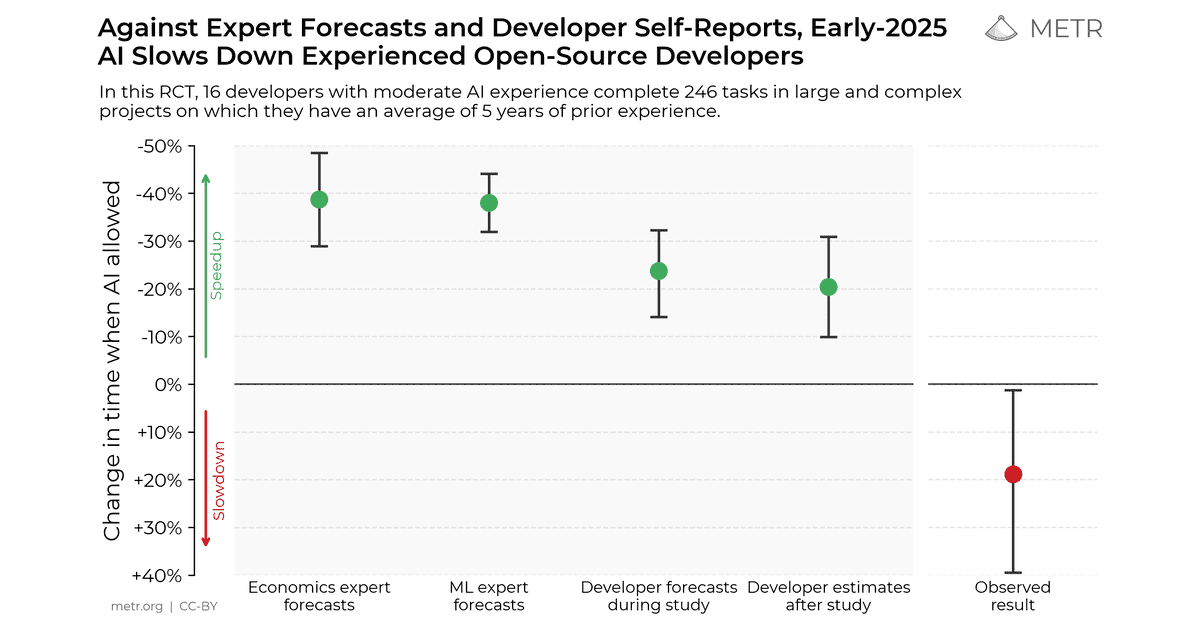 Measuring the Impact of Early-2025 AI on Experienced Open-Source Developer ProductivityWe conduct a randomized controlled trial to understand how early-2025 AI tools affect the productivity of experienced open-source developers working on their own repositories. Surprisingly, we find that when developers use AI tools, they take 19% longer than without—AI makes them slower.
 metr.org
Experienced open-source developers working on their own large repositories took 19% longer with early-2025 AI tools, even though they expected to be faster and believed afterwards that they had been. METR has since said it is redesigning the study as tools and usage patterns change, and that developers are likely sped up more by AI tools in early 2026 than in early 2025. METR is also explicit that selection effects make its new data only very weak evidence for the size of that change. Treat the 19% as a snapshot, not a verdict.
Put together, the evidence suggests a practical rule. Agentic coding pays off on well-scoped, testable tasks: adding endpoints, writing tests, migrations, upgrades, fixing a reproducible bug. It is much less reliable on large, unfamiliar or poorly tested codebases, where the agent's confident output costs more review time than it saves. Benchmarks such as SWE-bench measure progress on real GitHub issues, but no benchmark replaces a trial on your own repository.
Risks and controls when agents touch real systems
An agent that can run shell commands can also run the wrong one. Once a coding agent has a terminal, it is a piece of software with privileges, and it deserves the same scrutiny as any other.
The main risks:
- Secrets and credentials. Agents read environment files and logs. A leaked token in a commit or a prompt is a leaked token.
- Running untrusted code. Installing a dependency means executing someone else's install scripts.
- Supply chain. An agent can add a package with a plausible name that is not the one you meant.
- Hidden instructions. A README, an issue or a web page can contain text that tries to redirect the agent. That attack class is covered in depth in our article on prompt injection.
The controls are well understood, even if many teams skip them:
That last point is a pattern well beyond code. How to design approvals that do not become rubber stamps is the subject of our guide to human-in-the-loop AI agents, and the wider set of limits lives in AI agent guardrails.
Beyond the repo: the same loop runs operations work
Coding agents proved something important: the plan, act, verify loop works, as long as it runs inside guardrails. A sandbox limits the damage. A test suite tells the agent when it is wrong. A pull request puts a human between the agent and production.
Most business work has none of those built in. Triage a support inbox, clean up a CRM, chase unpaid invoices, compile a weekly report: the same loop applies, and so does the need for an isolated machine, a record of every action and an approval before anything leaves the building. Nobody gives an email a test suite.
This is also where workflow tools fall short. A flowchart in Zapier, Make or n8n fixes the path in advance, the same way autocomplete fixes the next line. It is predictable until reality does not match the diagram. An agent chooses its own path, which is exactly why it needs controls rather than more boxes. And a chatbot is not the answer either: as we explain in AI agent vs chatbot, a chatbot replies and waits, an agent keeps working after you close the tab.
Where Rerun fits, and where it does not
Rerun runs AI agents for that operations work. On Rerun, these agents are called coworkers. Your coworkers run 24/7 on your workspace's own private cloud machine, every action shows up live in logs anyone on the team can read, and consequential steps pause for your approval in the app, with an email when one is waiting, before anything goes out. Rerun is not tied to one framework or one model: you can use Claude, ChatGPT, Gemini and more.
To be clear about the limits: Rerun does not write your code. It is not an IDE or a coding agent, and it will not replace Claude Code, Codex or Cursor. Keep those for your repository. Rerun is for the coworkers doing the work around it, like turning raw bug reports into clean, prioritized tickets your engineers can hand to a coding agent:
The same discipline that makes agentic coding safe, scoped tasks, visible actions and a human sign-off, is what makes those coworkers trustworthy.

Agentic coding tools: the main categories
Tools change monthly, so it is more useful to know the categories than to memorize a ranking:
- Terminal agents run in your shell against your local repository (Claude Code, Codex CLI, OpenCode).
- IDE agents live inside an editor and blend chat, autocomplete and agent mode (Cursor, GitHub Copilot).
- Cloud and asynchronous agents take a ticket and come back with a pull request.
- App builders generate whole applications from a description, closer to vibe coding than to engineering.
For the head-to-head details, see our comparisons of Cursor vs Claude Code and Claude Code vs Codex, or the full ranking of the best AI coding agents.
Conclusion
Agentic coding is the first place where AI agents went from demo to daily habit, because code gives an agent what most work does not: tools, fast feedback and a natural checkpoint before anything ships. The model is the easy part. The hard part is the system around it: context the agent can read, tests that tell it when it is wrong, a sandbox that limits the damage and a human who approves the result.
Get those right in your repository, then carry the same discipline to every other agent you run.
Frequently asked questions
What is agentic coding in simple terms?
Agentic coding means giving an AI agent a software task instead of a single prompt. The agent plans the steps, edits files, runs commands and tests, fixes what fails and returns a diff or pull request for a human to review.
Is agentic coding the same as vibe coding?
No. Vibe coding is a style, coined by Andrej Karpathy, where you accept AI code without really reading it. Agentic coding is a mechanism where an agent works through a plan with tools. You can practice agentic coding rigorously, with specs, tests and code review, which is the opposite of vibe coding.
What are examples of agentic coding tools?
The main categories are terminal agents such as Claude Code, Codex CLI and OpenCode, IDE agents such as Cursor and GitHub Copilot in agent mode, cloud agents that turn a ticket into a pull request, and app builders that generate whole applications. Tools change quickly, so compare them on your own repository.
What is the best agentic coding tool?
There is no single best tool. Terminal agents like Claude Code and Codex CLI suit developers who live in the shell, while IDE agents like Cursor suit those who want agent mode next to autocomplete. The right choice depends on your repository, test coverage and review process, so run a trial on real tickets before committing.
How is agentic coding different from GitHub Copilot autocomplete?
Autocomplete predicts the next line while you type, and you accept or reject each suggestion. Agentic coding hands the AI a whole task: it explores the repository, edits several files, runs tests and returns a pull request. Copilot now offers an agent mode too, so the difference is the mode of work, not the brand.
Will agentic coding replace software engineers?
Not on current evidence. Agents handle well-scoped, testable tasks well, but they still need someone to define the task, provide context, design tests and review the result. A randomized trial by METR found experienced developers were 19% slower with early-2025 AI tools, though METR says 2026 tools likely do better. The engineer's role shifts toward specification and review.
Is agentic coding safe for production code?
It can be, with controls. Run agents in a sandbox, give them least-privilege tokens scoped to one repository, protect the main branch, require human review on every pull request, set budget limits and keep logs of every command. Never let an agent merge or deploy its own work without approval.
Do I need to know how to code to use agentic coding?
For production software, yes. You need to judge whether the diff is correct, whether the tests are meaningful and whether the change is safe. Non-developers can use app builders for prototypes, but reviewing agent output is still an engineering skill.
Can the same agent approach work outside of code?
Yes. The plan, act, verify loop applies to operations work such as inbox triage, CRM updates or reporting. The difference is that business tasks rarely come with tests, so you need visible logs and human approvals instead. That is what Rerun provides for its coworkers, which run 24/7 on your workspace's private cloud machine.

Clément Janssens