OpenAI Agent Builder is scheduled to shut down on November 30, 2026. OpenAI announced the deprecation on June 3, 2026, according to its official deprecations page. ChatKit remains available, but the visual builder does not have a future as a production dependency.
That changes the useful question. It is no longer simply, “What can OpenAI Agent Builder build?” The practical questions are what it did well, what existing users need to export, and which replacement fits the job.
Last verified September 11, 2026: Existing users can work in Agent Builder during the transition window. New production systems should start elsewhere.

OpenAI Agent Builder at a glance
| Question | Short answer |
|---|---|
| What was it? | A visual canvas for multi-step agent workflows |
| Is it still available? | During a transition window for existing users |
| Shutdown date | November 30, 2026 |
| Official migration paths | OpenAI Agents SDK or ChatGPT Workspace Agents |
| Should a new project use it? | No, not for a long-lived production system |
| Does ChatKit shut down with it? | No. OpenAI says ChatKit remains available |
What is OpenAI Agent Builder?
OpenAI Agent Builder was a visual interface in the OpenAI developer platform for assembling, testing, publishing, and exporting multi-step agent workflows. A workflow combined agents, tools, and control-flow logic. Users connected nodes on a canvas, configured typed inputs and outputs, previewed runs, and then deployed through ChatKit or exported Agents SDK code.
That definition matters because Agent Builder was not a model. It was not an autonomous worker by itself, either. It was an authoring surface for coordinating models, tools, and decisions.
Agent Builder vs AgentKit, Agents SDK, and ChatKit
These names are often collapsed into one product, but they sit at different layers:
| Product | Role | Current implication |
|---|---|---|
| Agent Builder | Visual workflow authoring | Deprecated and scheduled to shut down |
| AgentKit | Launch-era family of agent-building capabilities | Umbrella terminology, not a model |
| Agents SDK | Code-first orchestration and runtime building | Official migration path for developers |
| ChatKit | Embeddable chat experience | Remains available |
| ChatGPT Workspace Agents | Team-built agents inside eligible workspaces | Official migration path for internal team use |
The distinction prevents a common migration mistake: replacing a canvas with a chat UI while forgetting the execution, permissions, evaluation, and operational layers behind it.
How an Agent Builder workflow worked
The official Agent Builder guide describes a five-part path:
- Design a workflow on the visual canvas.
- Connect nodes and configure their data contracts.
- Preview the workflow with representative inputs.
- Publish a versioned snapshot.
- Deploy it with ChatKit or export Agents SDK code.
Typed edges made the graph easier to inspect. If one node promised a customer ID and a risk label, the next node could be configured to expect those fields. That was a meaningful improvement over passing loose natural-language blobs between every step.
 Agent Builder | OpenAI APIUse the OpenAI Agent Builder to start from templates, compose nodes, preview runs, and export workflows to code.
 OpenAI Developers
Is OpenAI Agent Builder still available?
Agent Builder is deprecated. OpenAI says existing users can continue during the transition period, with shutdown scheduled for November 30, 2026.
Shutdown timeline
| Date | Event |
|---|---|
| October 2025 | Agent Builder launched |
| June 3, 2026 | OpenAI announces deprecation |
| November 30, 2026 | Scheduled shutdown |
The related OpenAI Evals dashboard and API are also scheduled to shut down on November 30, 2026. If an Agent Builder workflow relies on trace graders or Evals, migration needs to cover both workflow execution and evaluation.
What existing users should do now
Export is a starting point, not a guarantee. OpenAI's migration guide warns that an export does not automatically reproduce the graph or ensure identical behavior. Integrations, authentication, permissions, and deployment settings need their own review.
Key OpenAI Agent Builder features
These features explain why the product attracted attention. They should now be read as capabilities to preserve during migration, not reasons to start a new dependency.
Visual workflow canvas
Users could drag nodes onto a canvas and connect them into a visible sequence. The graph lowered the cost of understanding a prototype, especially when a process routed work among several specialists or tools.
It was still not fully no-code. Custom tools, authentication, deployment, monitoring, security, and production incident handling could require engineering.
Typed inputs, outputs, and edges
Typed connections exposed the contract between steps. This reduced ambiguity and made it harder for one node to silently pass an unexpected shape downstream. Structured boundaries are also useful security controls because they narrow the channel through which untrusted content can influence later actions.
Templates, previews, and debugging
Users could begin from a template or a blank workflow. Preview mode accepted live or representative inputs, including sample files, and showed node-level execution. That made it useful for rapid prototyping and explaining a graph to collaborators.
Evaluations and trace graders
Agent Builder could select traces and run graders against workflow performance. A good migration must preserve the evaluation cases, not merely the happy-path prompt. The evaluation system itself needs replacement because OpenAI's Evals platform shares the same November 30 shutdown date.
Versioning, publishing, and export
Agent Builder autosaved work. Publishing created a major version that acted as a snapshot, and API calls could select older versions. Deployment took one of two paths: pass the workflow ID into ChatKit, or copy code and run or customize it with the Agents SDK.
What could you build with OpenAI Agent Builder?
The strongest use cases involved judgment plus tools, not a dressed-up text generator.
Customer support triage
A workflow could classify a request, retrieve account context, apply policy, draft a response, and route risky cases to a person. The important production detail is the handoff. A refund, cancellation, or account change should stop at a real approval gate.
Internal research
An agent could interpret a question, search approved sources, extract evidence, produce a cited result, and request review when confidence was low. This is a better fit than asking a chatbot to improvise from whatever happens to be in its context window.
Lead qualification and routing
A workflow could enrich a lead, score fit, update a CRM, and alert the appropriate seller. The agent may reason about incomplete information, while deterministic code should validate schemas, permissions, and writes.
Document intake
Invoices, applications, contracts, and compliance documents can pass through extraction, categorization, validation, and exception handling. The system should keep the original file, structured output, decision trace, and final action linked for auditability.
Specialist routing
Multiple agents can help when specialists genuinely need different tools or policies. They add cost and failure modes when a single agent plus deterministic routing would do. More boxes on a canvas are not automatically a better system.
A prototype proves that the happy path can run. Production operations prove that failures can be found, stopped, explained, and recovered.
Strengths and limitations
| Area | Strength | Limitation |
|---|---|---|
| Prototyping | Fast visual composition | Visual success can hide runtime complexity |
| Data flow | Typed edges clarify contracts | Natural-language behavior remains probabilistic |
| Debugging | Node-level previews and traces | Representative production failures still need tests |
| Deployment | ChatKit and code export paths | Hosting and operations remain your responsibility |
| Ecosystem | Native OpenAI integration | Vendor dependency and deprecation risk |
| Portability | Export to Python or TypeScript | The graph and behavior may not transfer exactly |
| Cost | Quick to test | Model, tool, storage, and infrastructure costs accumulate |
Agent Builder was good at making an agent graph legible. It was weaker as a durable abstraction boundary. Its retirement demonstrates a broader lesson: a visual canvas is not the operational system that keeps an agent reliable.
This is also where traditional automation metaphors break. Zapier, Make, and n8n are strong when each step is deterministic and the path is known in advance. A flowchart can show what should happen. It does not, by itself, govern a model that can choose an unexpected tool, misread an email, or continue after a partial failure.
A chatbot has the opposite weakness. It can handle an ambiguous conversation but usually waits for a person to drive every turn. Production agents need both reasoning and operations: schedules or triggers, scoped tools, durable state, approvals, traces, and recovery.
AI Workflow Automation: Use Cases, Tools, and How to Get Started (2026)
AI workflow automation runs multi-step work with agents that reason and act, not rigid if-this-then-that rules. Here are the real use cases, how the tools differ, and how to get started.
Safety and production considerations
OpenAI's agent safety guidance identifies prompt injection and private-data leakage as central risks. Retrieved web pages, documents, emails, and tool responses must be treated as untrusted input.
Separate instructions from untrusted data
Do not place raw external content into privileged instructions. Extract the small set of fields the next step needs, validate them, and pass them through a structured schema. Free-form text should not be allowed to become an executable instruction merely because an agent read it.
Apply least privilege
An inbox triage agent does not need billing admin access. A research agent does not need permission to publish. Credentials should be scoped to the narrowest task, separated by environment, and rotated independently.
Require approval for consequential actions
Human approval is not a Slack notification sent after the fact. It is a blocking state before the action occurs.
Use approval gates before an agent:
- sends an external message;
- creates, changes, or deletes a system of record;
- publishes content;
- spends money;
- changes permissions;
- makes a legal, financial, or account-level commitment.

Test failures, not just examples
A production evaluation set should include malformed inputs, unavailable tools, stale credentials, duplicate events, prompt injections, timeouts, partial writes, and ambiguous requests. Track latency and cost as well as output quality.
Best OpenAI Agent Builder alternatives
There is no universal replacement because the old product combined authoring, orchestration, previews, evaluation, and deployment. Choose the layer you actually need.
We compared the alternatives across authoring model, hosting, provider flexibility, human supervision, and who must operate the runtime. Product capabilities were verified against official documentation on September 11, 2026.
| Alternative | Best for | Visual builder | Code-first | Self-hosting | Multi-model | Main tradeoff |
|---|---|---|---|---|---|---|
| OpenAI Agents SDK | OpenAI-native product development | No | Yes | Yes | Partial | Engineering ownership |
| ChatGPT Workspace Agents | Shared internal agents | Partial | No | No | No | Workspace and graph constraints |
| n8n | Integration-heavy automation | Yes | Partial | Yes | Yes | Flowchart-first operations |
| LangGraph | Stateful custom orchestration | No | Yes | Yes | Yes | Steeper engineering curve |
| Langflow | Open-source visual experiments | Yes | Partial | Yes | Yes | Production hardening required |
| Copilot Studio | Microsoft-centric enterprises | Yes | Partial | No | Partial | Ecosystem dependence |
| Vertex AI Agent Builder | Google Cloud teams | Yes | Partial | No | Partial | Google Cloud dependence |
| Rerun | Operating agents with live visibility and approvals | Yes | No | Partial | Yes | Not a code framework |
OpenAI Agents SDK: best official code-first replacement
Use the OpenAI Agents SDK when an agent is part of a product and developers need explicit control over code, tests, hosting, and deployment. It is the closest official route for exported Python or TypeScript workflows. The tradeoff is clear: the team owns runtime behavior and operations.
ChatGPT Workspace Agents: best for internal team agents
OpenAI's Agent Builder migration guide identifies ChatGPT Workspace Agents as the conversational replacement for eligible Business, Enterprise, and Edu teams. They are not a faithful one-click conversion for deterministic workflow graphs. Apps, permissions, tools, and expected behavior must be reviewed independently.
n8n: best for integration-heavy automation
n8n's official hosting documentation describes its self-hosted deployment options. It is a sensible choice when the core job is moving data through integrations and an AI step is one part of a larger deterministic workflow. Its visual graph is valuable. It becomes less natural when the system needs ongoing judgment, dynamic delegation, memory, and human supervision across many runs.
LangGraph: best for controllable custom orchestration
LangGraph's official overview positions it around durable execution, human-in-the-loop control, memory, and production agent orchestration. It suits developers who need explicit state and branching. It offers more runtime control than a retiring hosted canvas, but it is a framework. Your team still needs to operate what it builds.
Langflow: best for open-source visual experimentation
Langflow's documentation describes its open-source visual environment and component-based flows. It can be a productive way to explore chains and agents with broader provider flexibility. Production use still demands careful deployment, observability, security, and failure handling.
Copilot Studio and Vertex AI Agent Builder: best for cloud-aligned enterprises
Microsoft Copilot Studio is strongest when identity, data, administration, and distribution already center on Microsoft 365 and Power Platform. Vertex AI Agent Builder is strongest for Google Cloud teams that value managed infrastructure, enterprise search, and grounding in that ecosystem. In both cases, confirm current capabilities and pricing against official documentation before committing.
Where Rerun fits, and where it does not
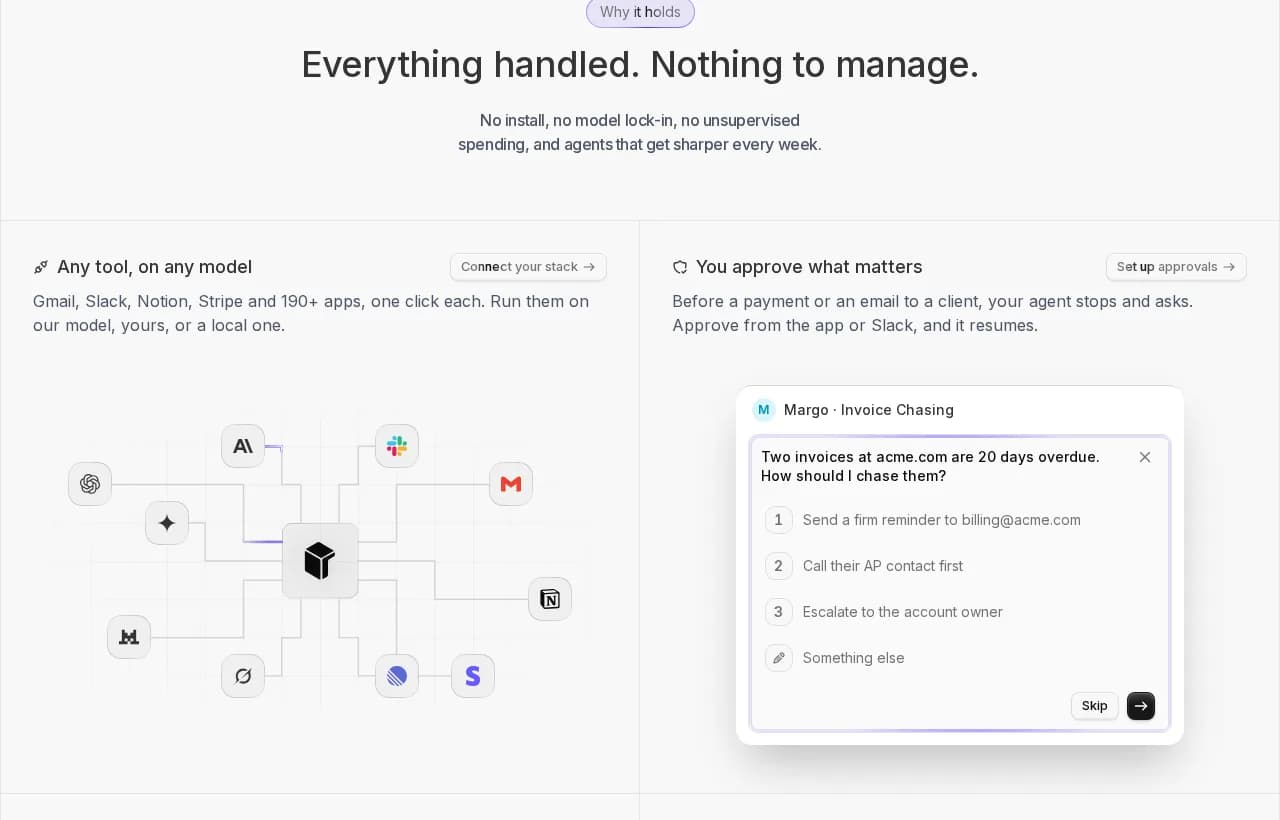
Rerun is not an agent framework and does not replace the Agents SDK or LangGraph for writing application runtime code. It is a framework-agnostic operations layer for running an AI workforce: triggers and schedules, connected tools, live execution visibility, human approvals, memory, team access, and a private machine.
That distinction is useful during migration. A team can keep code in its chosen framework while giving operators a place to see work happen and stop consequential actions. Unlike a chatbot, agents run without someone prompting every turn. Unlike a static Zap or flowchart, operators can inspect reasoning-driven work and intervene when judgment matters.
| Tool type | Best at | Structural limitation |
|---|---|---|
| Zapier or flowchart automation | Known steps and deterministic integrations | Assumes the path is defined in advance |
| Chatbot | Interactive, user-led conversations | Waits for a person to initiate and steer each turn |
| Agent framework | Building custom reasoning runtimes | Developers still own deployment and operations |
| Rerun | Running and supervising ongoing agent work | Not a code framework for embedding an agent runtime |
Zapier automates a predefined path. A chatbot answers the person in front of it. Rerun gives autonomous agents somewhere to run, and operators somewhere to watch, approve, and intervene.
How to choose
- Choose Agents SDK for OpenAI-native application development.
- Choose Workspace Agents for shared internal work in an eligible ChatGPT workspace.
- Choose n8n when integrations and deterministic routing are the center of the job.
- Choose LangGraph for stateful, code-first orchestration.
- Choose Langflow for open-source visual experimentation.
- Choose Copilot Studio or Vertex AI Agent Builder when cloud governance determines the stack.
- Choose Rerun when the missing layer is operational visibility, schedules, approvals, and an accessible control surface across agents.
How to migrate from OpenAI Agent Builder
1. Map the workflow before exporting
Capture more than the visible nodes. Record the behavior that surrounds them.
{
  "workflow": "support-triage",
  "owner": "customer-operations",
  "inputs": ["customer_id", "message", "attachments"],
  "tools": ["knowledge_search", "crm_read", "ticket_update"],
  "approval_before": ["send_reply", "issue_refund"],
  "expected_outputs": ["category", "risk", "draft", "next_action"],
  "failure_cases": ["tool_timeout", "missing_customer", "prompt_injection"],
  "evaluation_set": "support-triage-v4"
}2. Export the workflow
Open the workflow, select Code, choose Agents SDK, then select TypeScript or Python. Preserve the complete export in version control before changing it.
Agent Builder workflow
  -> exported Agents SDK code
  -> reviewed tools and permissions
  -> replacement evaluation suite
  -> staged runtime
  -> monitored production traffic
3. Choose the replacement architecture
Use the Agents SDK for an application runtime. Consider Workspace Agents for conversational internal workflows. Use another framework when model portability, self-hosting, or explicit state management is a priority. Add an operations layer when non-developers need to supervise ongoing work.
4. Reconfigure tools and permissions
Assume nothing transfers automatically. Recreate credentials, connected apps, publishing settings, approval rules, and deployment configuration. Verify read permissions separately from write permissions.
5. Run parity and failure tests
Replay representative traces and compare structured outputs. Then test the unpleasant cases: timeouts, duplicated triggers, tool denial, malicious document content, partial writes, and approval expiration. Observe cost and latency under real concurrency.
6. Cut over gradually
Send a small portion of traffic to the replacement, compare outcomes, and keep a rollback path. Complete the move before the shutdown deadline, leaving time for fixes rather than treating November 30 as the migration date.
Is OpenAI Agent Builder worth using in 2026?
For a new production project, no. A product scheduled to shut down should not become a new long-term dependency.
For an existing workflow, use the remaining access to inspect, document, export, and migrate. For learning, the canvas may still illustrate typed nodes and routing, but invest durable learning time in the replacement architecture.
The larger lesson is not that visual builders are useless. It is that authoring and operations are different jobs. A graph helps you design a path. Production readiness comes from permissions, evaluation, live visibility, approvals, durable state, and recovery when the path breaks.
If your migration leaves you with runnable code but no place for operators to see and govern the work, the migration is incomplete.
AI Agent Governance: What It Is and Why It Matters
AI agent governance controls what autonomous agents can access and do, enforced at runtime, not just on paper. Here are the five pillars of a real framework and how to close the gap between policy and enforcement.
Frequently asked questions
What is OpenAI Agent Builder?
OpenAI Agent Builder was a visual canvas for assembling, testing, publishing, and exporting multi-step agent workflows. OpenAI has deprecated it and scheduled it to shut down on November 30, 2026.
Is OpenAI Agent Builder shutting down?
Yes. OpenAI announced the deprecation on June 3, 2026, and says Agent Builder is scheduled to shut down on November 30, 2026. ChatKit remains available.
What replaces OpenAI Agent Builder?
OpenAI recommends the Agents SDK for code-based application development and ChatGPT Workspace Agents for conversational agent creation and team sharing. Other platforms may fit teams needing visual workflows, multi-model support, or self-hosting.
Is OpenAI Agent Builder free?
Access and underlying usage costs can differ. Model calls, tools, storage, and infrastructure may be billed separately, so check OpenAI’s current pricing and account access before estimating migration costs.
Is OpenAI Agent Builder no-code?
Not entirely. The visual canvas reduced coding during prototyping, but custom tools, authentication, deployment, security, monitoring, and production operations could still require engineering.
Can Agent Builder workflows be exported?
Yes. Existing workflows can be exported as Python or TypeScript Agents SDK code. OpenAI cautions that export does not automatically reproduce every part of the workflow graph or guarantee identical behavior.
What is the best OpenAI Agent Builder alternative?
Use the Agents SDK for OpenAI-native products, Workspace Agents for internal team workflows, n8n for integration-heavy automation, LangGraph for code-first stateful orchestration, or Rerun when operational visibility and human approvals are the missing layer.

Clément Janssens